

Embedded Display Modules Explained
“Embedded” is one of the most overloaded words in the display business, and on a spec sheet it rarely means what a software engineer thinks it means. Here it describes how much of the drive electronics is built into the display unit, not that the display runs an embedded operating system. An embedded display module ships with its driver and controller already integrated, so the host talks to it over a simple bus instead of driving the raw glass. This page defines the term, sorts out the three different things this site has historically called “Embedded LCD,” and helps you decide when an integrated module is the right call. For the buses named below, it leans on the interface quick reference rather than re-teaching them.
Part of the Embedded Displays knowledge hub.
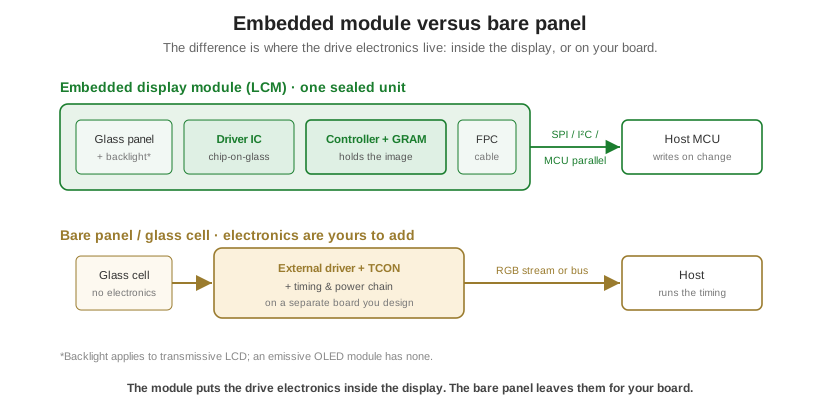
What “embedded” means for a display module
An embedded, or integrated, display module is the glass panel plus its driver IC, usually a controller with its own memory, plus the backlight where applicable and a flex cable or PCB, all bonded into one deliverable unit. You send it pixels or commands over a logic bus and it takes care of driving the rows and columns. The opposite is a bare panel, the raw LCD or OLED cell with no electronics on it. A bare cell shows nothing until you add an external driver, a timing and power chain, and the board to carry them. The bonded, ready-to-drive assembly is what the industry calls an LCD module, or LCM; the same idea gives you a TFT module or an OLED module. That integrated bundle is the difference between a module and a bare cell.
Three pieces of silicon get conflated here, and keeping them apart is most of the battle. A driver supplies the analog voltages that turn pixels on and off, and nothing more. A controller with GRAM adds a pixel frame buffer and a command engine on top of that driver, so you write an image once and the chip holds and refreshes it on its own. The small-module controllers most engineers meet, an SSD1306 on a mono OLED or an ILI9341 or ST7789 on a small color TFT, are this class: a controller and driver on one die, with the frame memory built in. A timing controller, or TCON, is a different animal that belongs to large TFT panels fed by a streaming interface; it aligns and times a live pixel stream and stores no frame. Calling an ST7789 a TCON, or assuming every module has a frame buffer, is the mistake to avoid. The controller is usually bonded straight to the glass by chip-on-glass (COG) packaging, which is what keeps an integrated module thin and sealed.
One thing “embedded display module” is not is a datasheet part class. It is a category label for integration level, a display that arrives with its drive electronics inside it. The precise terms are LCM, TFT module, OLED module, and, for the ones that go a step further, intelligent or smart display module. That looseness is exactly why the same two words point at three different things on this site.
The three things colliding under “Embedded LCD”
Search this site for “embedded” and you land on three surfaces that look unrelated but describe the same idea. This article is the canonical explainer all three point to.
- The TFT-side embedded modules in the product catalog. These are the technically correct use of the word: TFT and LCD modules that ship with the driver and controller integrated, in the integration sense above.
- The “Embedded LCD” store filter. This is a shopping bucket in the catalog taxonomy, a way to browse, not a specification. Treat it as a category term, not a measurable attribute of a part.
- The old “Embedded Display” Knowledge Center page, our Embedded LCD Basic Function Tutorials (VIDEO). Older editorial wording for the same concept, kept live for its walkthrough videos, and still worth a look for the hands-on tutorials it holds.
They reconcile in one sentence: “embedded” describes integration level, drive electronics built into the module, not a distinct product class. The store filter and the legacy page both point at the same thing, a display that ships ready to drive. Once you read it that way, the architecture facts below, on-glass memory versus a host that streams, do the rest of the disambiguating.
Common interfaces for embedded modules
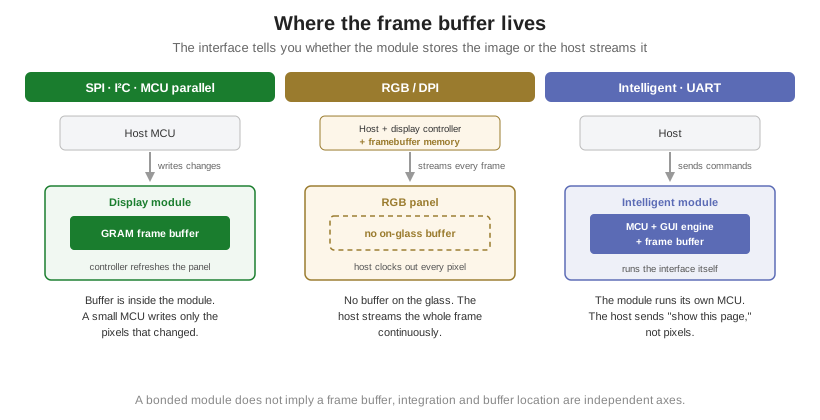
The interface on an embedded module tells you one architecturally important thing: where the frame buffer lives. This is the divide worth internalizing; the full envelope for each bus is in the interface quick reference, and how to read one off a spec sheet is in how to read a display datasheet.
SPI, I²C, and MCU parallel (8080 / 6800) all target a controller with GRAM. The host writes the image into the module’s own memory and the controller refreshes the panel from it, so a modest MCU can run the display and only resend the pixels that changed. I²C uses the fewest pins and the least bandwidth, typical of small mono OLED and character modules; SPI is the workhorse for small color TFT; MCU parallel pushes more throughput to the same GRAM-backed controller. RGB, or DPI, is the exception: an RGB panel has no on-glass frame buffer, so the host must clock out every pixel of every frame continuously over its own display controller and framebuffer memory. A one-word warning here, an RGB display is still a fully bonded module, but being a module does not give it a frame buffer; integration and framebuffer architecture are independent axes. A further tier up, intelligent modules driven over UART carry their own MCU, firmware, and GUI engine, so the host sends high-level commands like “show this page” instead of pixels, trading a proprietary toolchain and a higher unit price for almost no display work on the host.
Embedded module or bare panel plus a separate driver
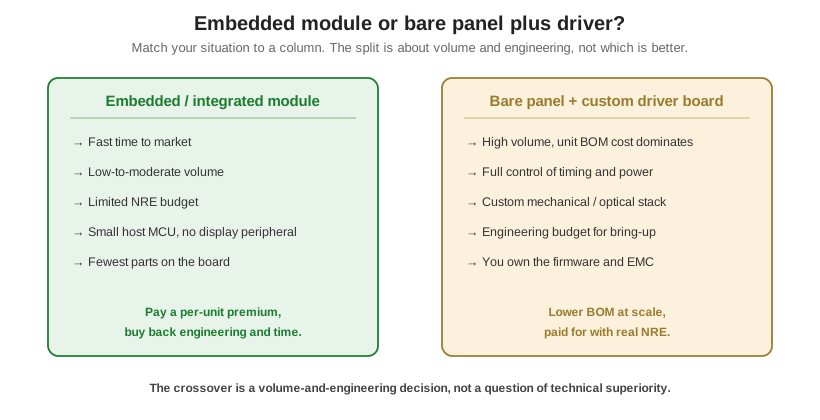
There is no universally right answer, and the honest version of the tradeoff turns on volume and on where you want to spend engineering, not on which is technically better. An integrated module solves the drive chain for you: fewer parts, less board space, a lighter load on the host, and a faster path to a working product. A bare panel with a driver board you design yourself can strip cost out of the bill of materials at high volume and hand you full control of timing, power, and the optical stack, but the NRE, the bring-up, and the firmware are now your problem. This is the same integrate-or-build decision covered from the sourcing side in custom versus off-the-shelf displays.
| Factor | Embedded / integrated module | Bare panel + your own driver board |
|---|---|---|
| Time to market | Fast; drive chain is solved and characterized | Slower; driver selection, timing, and bring-up are yours |
| BOM & board space | Fewer parts; driver, controller, power are inside | More parts on your board, but no integrated-module premium |
| Host burden | Low; GRAM controller lets a small MCU write on change | Higher; host may need to stream frames and run the timing |
| Engineering / NRE | Minimal display-side hardware design, mature reference code | Real NRE: driver/TCON, power sequencing, EMC, firmware |
| Unit cost at high volume | Carries the integration premium per unit | Can be lower once volume amortizes the engineering |
| Control & flexibility | Constrained to the module’s design | Full control of timing, power, and mechanical/optical fit |
| Best when | Low-to-moderate volume, limited NRE, speed matters | High volume where per-unit BOM dominates the total cost |
Where to go from here
If an integrated module is the right level for your build, the embedded parts live in the product catalog: the embedded TFT modules on the TFT line, and the Embedded LCD modules category that the store filter points at. Orient Display builds these as TFT and LCD modules to a spec rather than around a fixed one, and can integrate a controller with GRAM so a low-end MCU drives a panel that would otherwise need a full RGB host. When you have narrowed the interface and the integration level, start a custom project to turn it into a part.