

Introduction of Lichee Pi
An overview of the Lichee Pi Zero and Nano boards: Allwinner SoCs, CPU, memory and storage, and RGB LCD support with an onboard resistive touch chip.
On this page
Introduction of Lichee Pi
The LicheePi is a delicate, single-board computer, running on the low-cost Allwinner V3S platform which is popularity in recent years. It can be used for beginners to learn Linux or for product development. it offers a wealth of peripherals (LCD, ETH, UART, SPI, I2C, PWM, SDIO…) and powerful performance.
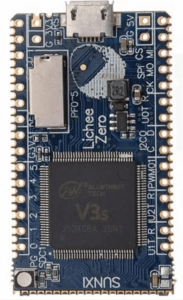
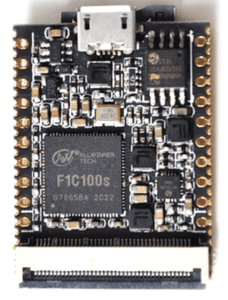
Lichee Zero Lichee Nano
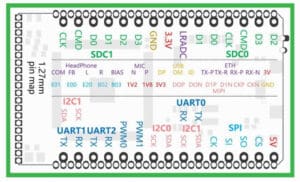
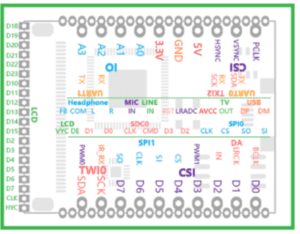
Lichee Pi Zero Lichee Pi Nano
| Features |
LICHEE PI ZERO |
LICHEE PI NANO |
| SoC | Allwinner V3S | Allwinner F1C100S |
| CPU | ARM Cortex-A7 | ARM9 |
| Operating Freq. | 1.2GHz | 408MHz |
| RAM | 64MB DDR2 | 32MB DDR2 |
| Storage | SPI Flash/Micro-SD | SPI Flash/Micro-SD |
Display
|
* Universal 40P RGB LCD FPC:
* Supported resolutions: 272×480, 480×800,1024×600 * Onboard RTP chip, supports a touch screen |
* Universal 40P RGB LCD FPC:
* Supported resolutions: 272×480, 480×800,1024×600 * Onboard RTP chip, supports a touch screen |
Interface
|
* SDIO x2 * SPI x1 * I2C x2 * UARTx3 * 100M Ether x1(include EPHY) * OTG USB x1 * MIPI CSI x1 * PWM x2 * LRADC x1 * Speakerx2 + Mic x1 |
* SDIO x1 * SPI x2 * TWIX x3 * UART x3 * OTG USB x1 * TV out* PWM x2 * LRADC x1 * Speakerx2 + Mic x1 |
Electrical Information |
Micro USB 5V, 2.54mm pins 3.3V~5V power supply; 1.27mm stamp hole power supply.
1GHz linux IDLE run 90~100mA; cpu-burn run ~180mA Storage Temperature -40~125 Operating Temperature -20~70 |
Micro USB 5V, 2.54mm pins 3.3V~5V power supply; 1.27mm stamp hole power supply.
408MHz linux IDLE run 90~54mA; with screen operating current ~250mA Storage Temperature -40~125 Operating Temperature -20~70 |
The temperature when running the Linux stress test is only slightly higher than the body temperature.
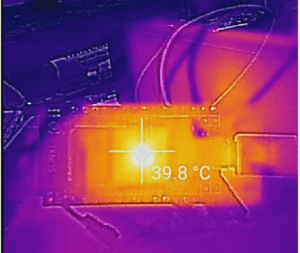
Lichee Pi support many OS such as: Linux, RT-Tread, Xboot or no OS.
Like most MCU, the Lichee Pi can connect to several low-speed interfaces, such as GPIO, UART, PWM, ADC, I2C, SPI, and more. Moreover, it can run other high-speed peripherals such as RGB LCD, EPHY, MIPI CSI, OTG USB, and more. The Lichee Pi has an integrated codec that allows direct connection to a headphone or microphone.
Display Connector:
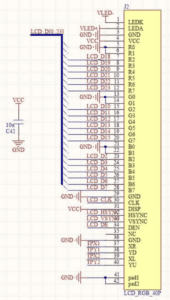
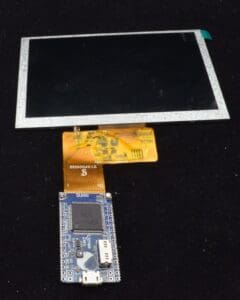
The universal 40P LCD comes with a led back light and four-wire lines, electrical resistance touch, which is very suitable for display and interaction.
Before connecting an ORIENT DISPLAY panel, check the 40P FPC pinout against the panel’s datasheet.
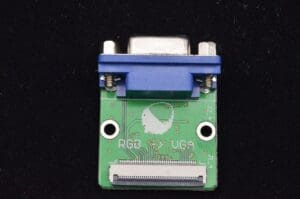
RGB to VGA:
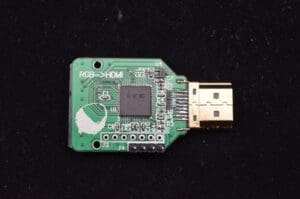
RGB to HDMI:
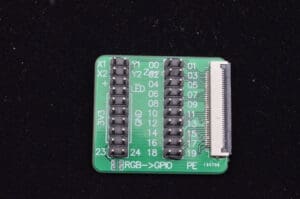
RGB to GPIO:
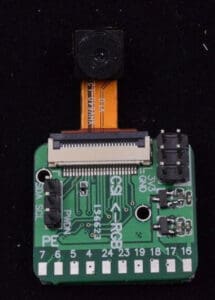
RGB to DVP CSI:
Lichee Pi Link:
https://dl.sipeed.com/
Wiki:maixpy.sipeed.com
Blog:blog.sipeed.com
Telegram group: https://t.me/sipeed
Frequently asked questions
What is the LicheePi?
What is the difference between Lichee Pi Zero and Lichee Pi Nano?
Which operating systems does the Lichee Pi support?
What displays can the Lichee Pi drive?
What temperature range does the Lichee Pi support?
New engineering articles by email.
Keep reading
Embedded Display Modules Explained
Embedded DisplaysDisplay Controller and Driver ICs
Embedded DisplaysChoosing a Display for Raspberry Pi: HDMI vs. MIPI DSI, Bridge Chips and Native Panels
Control Boards & EmbeddedRaspberry Pi Prototype to Production: Choosing a Display Path
Control Boards & EmbeddedThe Mini-PC: Small Footprint, Serious Versatility
Control Boards & EmbeddedHow to Estimate Battery Life for Your Device – Even with Sleep Modes
Have a display project in mind?
Talk to an engineer about the display your application needs.