

Raspberry Pi Prototype to Production: Choosing a Display Path
On this page
This article is for product teams taking a Raspberry Pi or Compute Module design from a working prototype to a production build. It compares the three display paths (HDMI, MIPI DSI through a bridge chip, and a native MIPI panel) by enclosure, cabling, software effort, bill of materials and supply life, and lists the checks to make before you order samples. For the connector, pinout, bridge and bring-up detail, see Choosing a Display for Raspberry Pi: HDMI vs. MIPI DSI.
1. What Changes Between Prototype and Production
A prototype has one job: show that the product works. Display decisions at that stage favour speed, so most teams start with a Pi-ready HDMI display and a USB touch connection.
A production design is judged on different terms:
- Enclosure. Connector depth and cable routing set how thin the housing can be.
- Assembly. Every cable assembly is a part to build, test and stock.
- Unit cost. At volume, the display interface affects the bill of materials directly.
- Supply life. The panel has to stay available for the life of the product.
- Software ownership. Someone has to maintain the display configuration through OS and kernel updates.
The display interface is one of the few early choices that touches all five, and it gets expensive to change after the enclosure is tooled.
2. The Three Display Paths
- HDMI. The display identifies itself to the Pi over HDMI and touch usually runs over USB. It works with no display-specific software. This is the prototype default, and a valid production choice at low and medium volumes.
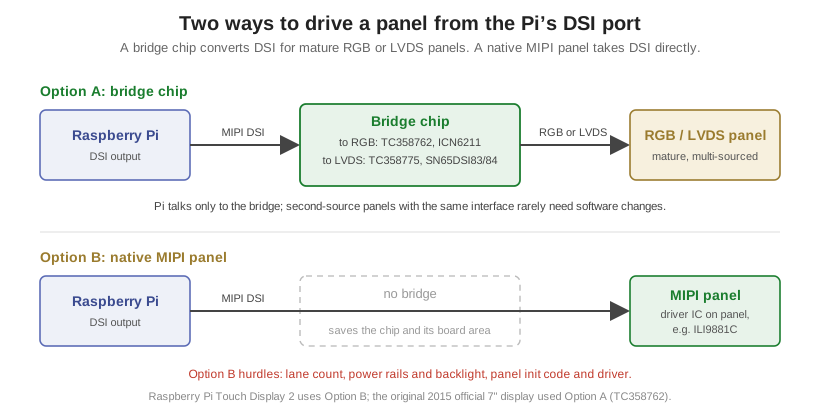
- MIPI DSI with a bridge chip. A bridge converts the Pi’s DSI output to the parallel RGB or LVDS interface that many industrial panels use. One flat flexible cable (FPC) can carry video, touch data and logic power.
- Native MIPI panel. The panel takes DSI directly, so there is no bridge. The carrier or adapter board supplies the panel’s power rails and backlight drive, and the software sends the panel’s initialization sequence.
3. Comparing the Paths
| HDMI | DSI + bridge chip | Native MIPI panel | |
|---|---|---|---|
| Enclosure | Deepest: HDMI and USB connectors plus the display’s controller board | Thin: one FPC to the display | Thinnest: one FPC, no bridge |
| Cabling | HDMI cable plus USB for touch | One FPC; touch over I2C on the same cable | One FPC; touch over I2C on the same cable |
| Software effort | None for the display | Device-tree overlay; bridge driver must be in the kernel or supplied | Overlay plus panel init code; panel driver must be in the kernel or supplied |
| Board work | None | Bridge on the display module or on the carrier | Power rails, backlight driver and reset logic on the carrier or adapter |
| Bill of materials | Highest per unit | Adds a bridge IC | Lowest: no bridge |
| Supply life | Depends on the module | Long: RGB and LVDS panels are mature and multi-sourced | Can be shorter: many native panels come from phone-class lines |
| Best fit | Prototype, low and medium volume | Long-life products on industrial panels | Volume products with in-house display software |
4. Check Lane Count Before You Choose a Panel
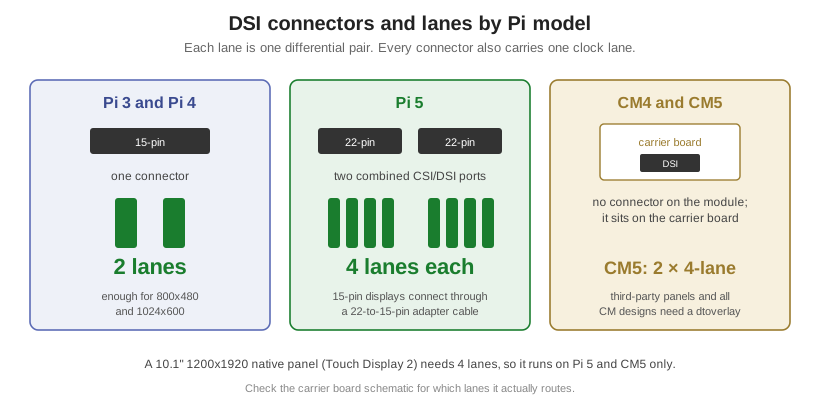
A DSI panel needs a set number of data lanes, and the board must provide them. This is the most common reason a panel chosen early fails to run on the production board.
| Board | DSI lanes available |
|---|---|
| Raspberry Pi 3 and Pi 4 | 2 lanes |
| Raspberry Pi 5 | Two 4-lane interfaces |
| Compute Module 4 | DSI0: 2 lanes. DSI1: 4 lanes |
| Compute Module 5 | Two 4-lane interfaces |
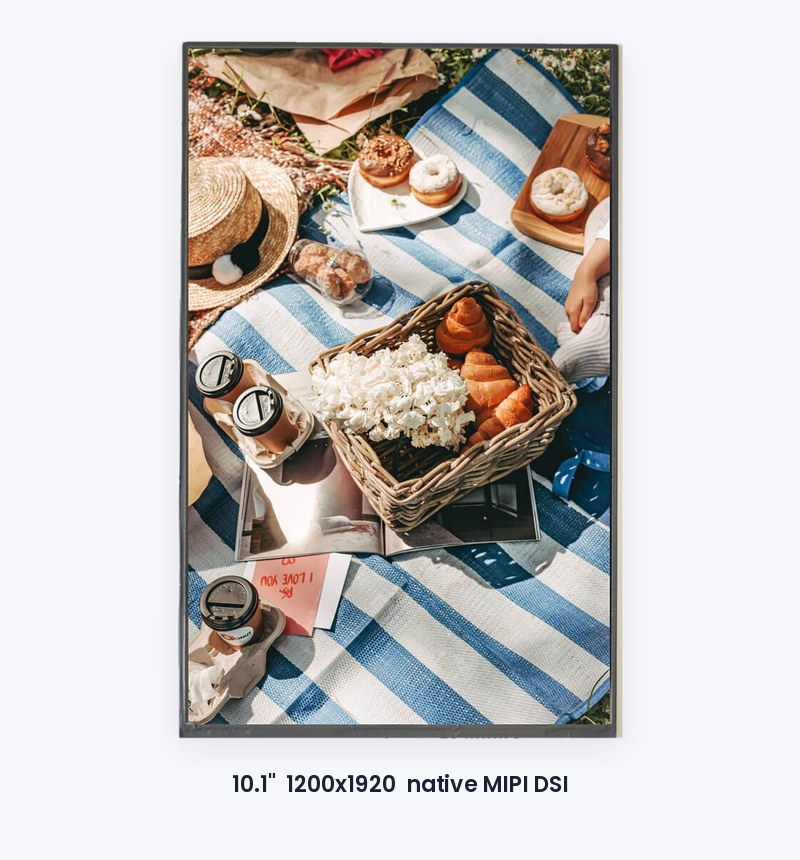
A 4-lane panel such as a 1200×1920 portrait display therefore runs on Pi 5, CM5, or CM4 on DSI1, and not on Pi 4 or earlier. On a Compute Module, the DSI connectors sit on the carrier board, so the carrier design must route the lanes the panel needs.
5. Check Driver Support in the Raspberry Pi Kernel
Whether a bridge or panel driver is already built into Raspberry Pi kernels decides how much software you own.
| Part | Role | In Raspberry Pi kernel builds |
|---|---|---|
| Toshiba TC358762 | DSI to RGB bridge (single lane on the Pi) | Yes |
| TI SN65DSI83/84 | DSI to LVDS bridge | Yes |
| Ilitek ILI9881C | Native panel driver IC | Yes |
| Ilitek ILI79600A | Native panel driver IC | Yes |
| Chipone ICN6211 | DSI to RGB bridge | No: driver comes with the display |
| Toshiba TC358775 | DSI to LVDS bridge | No: driver comes with the display |
| Himax HX8279 | Native panel driver IC | No: driver comes with the display |
Raspberry Pi ships overlays for its own displays. For any other panel, the device-tree overlay that describes it comes from the display supplier or your own team.
6. Questions to Answer Before Ordering Samples
- Volume and lifetime. How many units a year, for how many years? Long lifecycles favour bridge designs on mature panels.
- Production board. Which Pi model or Compute Module ships, and how many DSI lanes does the carrier route to the display connector?
- Software ownership. Who writes and maintains the overlay and any panel init code? Get the initialization data in writing before samples arrive.
- Touch. USB, as on most HDMI modules, or I2C through the DSI cable? Confirm the touch controller is rated for the panel size.
- Enclosure. Has the housing depth been set with the display’s connector and cable exit in mind?
7. How Orient Display Can Help
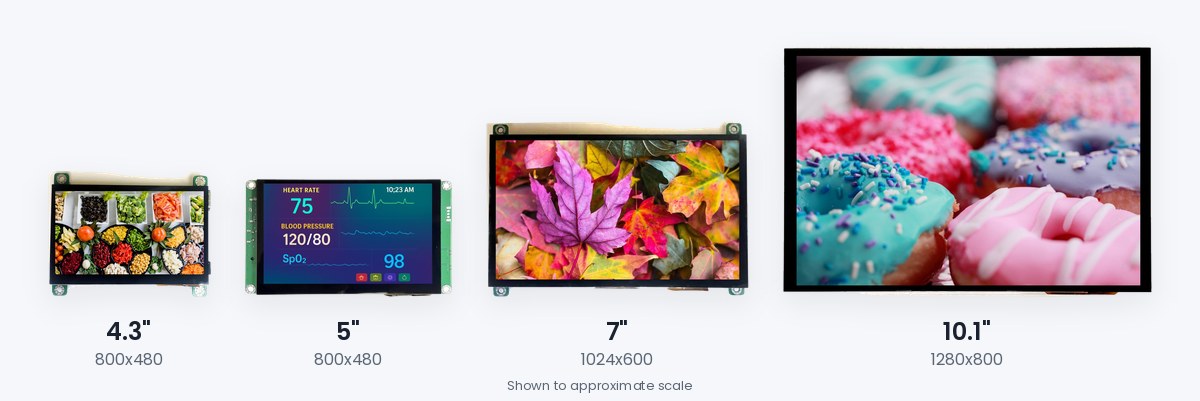
Orient Display supports Raspberry Pi and Compute Module designs at each stage: Pi-ready HDMI displays in 4.3″, 5″, 7″ and 10.1″ for prototypes and lower volumes; custom DSI-input display modules with the bridge on the module, for which our engineers provide and test the Raspberry Pi overlay as part of each design; and native MIPI panels such as the 10.1″ 1200×1920 AFC12001920A0-10.1INTM-I, with the Raspberry Pi integration customized for the design. Contact our engineering team to review your board, panel size and volume.
Frequently asked questions
Can a production product stay on HDMI?
Which Raspberry Pi boards can drive a 4-lane DSI panel?
Do I need a bridge chip to use MIPI DSI on a Raspberry Pi?
Is my display driver already in the Raspberry Pi kernel?
How does touch connect on a DSI display?
When should we bring the display supplier in?
From the knowledge base
Have a display project in mind?
Talk to an engineer about the display your application needs.