

How to Read a Display Datasheet
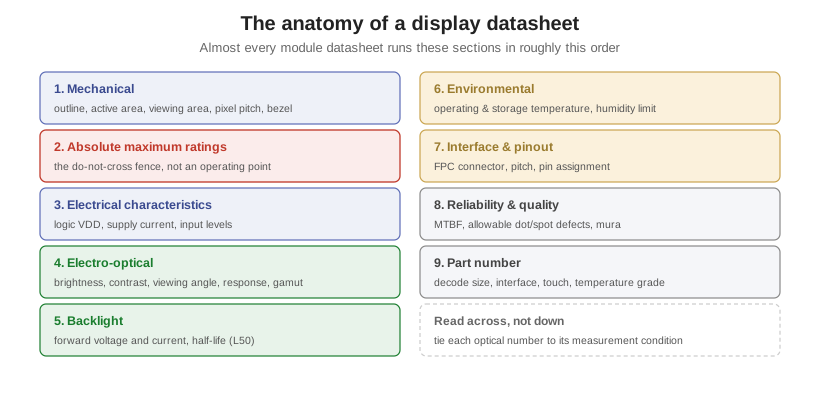
A display module datasheet packs the whole part into a few pages of tables, and most of the numbers only mean what they say once you know the condition attached to them. Reading one well is the first step of specifying a display: it is where brightness, temperature, interface, and lifetime all get pinned down. This article walks the standard sections in the order they usually appear, and flags the handful of numbers that trip people up. Where a section maps to a deeper topic, it links out, starting with display interfaces for the electrical side.
Part of the Specifying and Sourcing knowledge hub.
The four size numbers
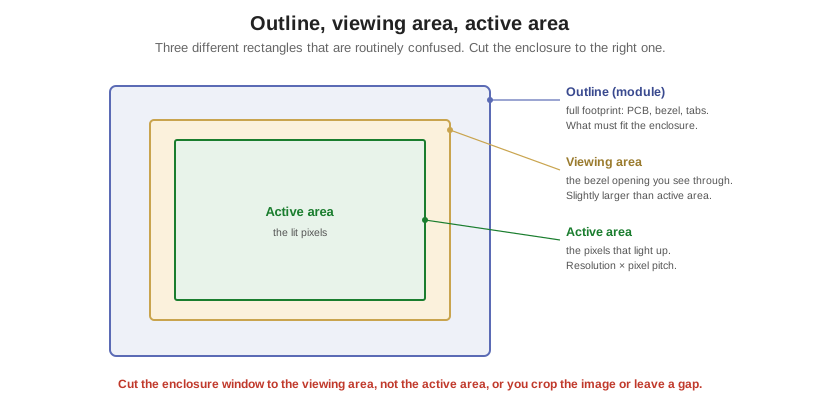
The mechanical section defines the physical part, and it carries three area numbers that are constantly mixed up. The outline, or module dimension, is the full footprint including the PCB, bezel, and mounting tabs; it is what has to physically fit the enclosure. The viewing area is the opening in the bezel you actually see through, slightly larger than the pixels. The active area is the region that lights up, the pixels themselves, equal to the resolution times the pixel pitch. Cut the enclosure window to the viewing area, not the active area, or you will either crop the image or leave a visible dark gap. The fourth number, pixel pitch, is the center-to-center spacing of pixels and sets how fine the image looks; on a color panel watch whether the datasheet quotes pixel pitch or the finer dot pitch, since each pixel is three RGB subpixels.
The optical spec and its fine print
The electro-optical section is where the display’s look is specified, and nearly every number here carries a measurement condition worth reading. Brightness, in cd/m², is measured at the panel center, on-axis; a cover lens, touch sensor, or anti-glare film each subtracts transmission, so what the user sees at the cover glass is lower, a point developed in specifying brightness and sunlight readability. Contrast ratio is an on-axis, dark-room figure; real ambient light collapses it far below the datasheet number, so a 500:1 spec does not mean 500:1 on a sunlit bench. Viewing angle is the angle from normal at which contrast stays above a threshold, and monochrome parts also quote a viewing direction, the 6 or 12 o’clock bias, which is a design choice to match how the product is mounted, not a defect. Response time and color gamut round it out, but their definitions vary by maker: response time may be rise-plus-fall or gray-to-gray, and a gamut percentage is meaningless without its reference, since percent of NTSC, sRGB, and DCI-P3 are different yardsticks.
Electrical, and the absolute-maximum trap
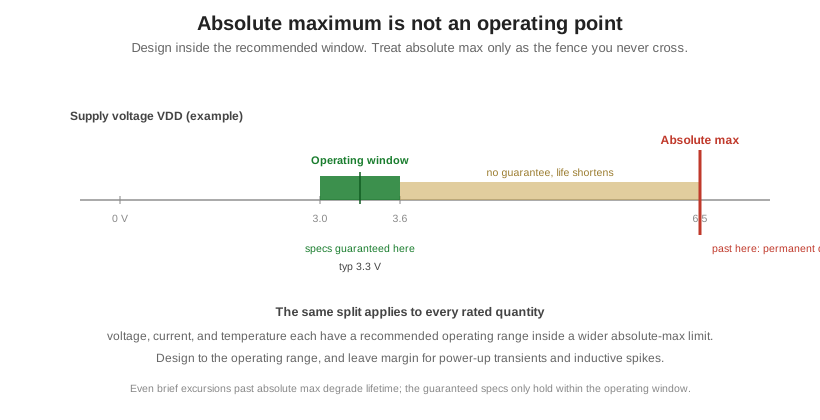
The electrical section lists the logic supply voltage and current, the input logic levels, the interface, and the backlight’s forward voltage and drive current. The single most consequential reading error in a datasheet lives next to it: confusing absolute maximum ratings with recommended operating conditions. These are two different tables. Absolute maximums are stress limits the part must never see, even briefly; exceeding them, an over-voltage on VDD or a temperature past the storage limit, causes permanent, non-recoverable damage. Recommended operating conditions are the narrower window inside which the specified performance is actually guaranteed. A panel with an absolute-max VDD of 6.5 V may have a recommended operating range of only 3.0 to 3.6 V. You design to the operating window and treat absolute max purely as the fence you never cross, leaving margin for power-up transients and inductive spikes.
Environment, reliability, interface, and the part number
The remaining sections are shorter but decide whether the part survives and connects. Environmental lists operating and storage temperature and a humidity cap; storage range is always wider than operating, and a wide-temperature grade is a distinct part, covered in display operating temperature. Reliability gives the backlight half-life, usually at a stated drive current and 25°C, plus MTBF and the acceptance criteria for dot and spot defects; the distinction between half-life, MTBF, and service life is drawn out in display lifetime and reliability. The interface and pinout section gives the connector, most often an FPC tail with a stated pin count and pitch, and the pin assignment; getting pin-1 orientation and pitch right is a common integration failure. Finally the part number is a structured code encoding size, resolution, interface, touch option, and temperature grade, but the field meanings are maker-specific, so decode it against that maker’s own legend rather than assuming.
Reading it like an engineer
A few habits separate a careful reading from a hopeful one. Design to the min and max columns, not typical: brightness, contrast, and current are usually quoted typical, and panel-to-panel variation is real, so power and timing budgets belong on worst case. Remember that brightness at the panel is not brightness the user sees, because every layer in front of it costs transmission. Compare definitions, not just digits, since viewing angle at a 10:1 threshold and at 5:1, or response time as rise-plus-fall versus gray-to-gray, are different numbers wearing the same name. And treat every headline optical figure as attached to its condition. The table below gives orientation on the ranges you will see, not guarantees.
| Parameter | Typical range | Notes |
|---|---|---|
| Logic supply VDD | 1.8 / 3.3 / 5.0 V | 3.3 V most common on TFT |
| Brightness (luminance) | 200–1200 cd/m² | LED 400–1000+; sunlight-readable 1000+ |
| Contrast ratio | 150:1 to 1000:1 | On-axis, dark room; IPS higher, TN/STN lower |
| Viewing angle (per side) | 45° to 80°+ | TN ~45°; IPS ~80° all sides |
| Response time | 10–40 ms | Gray-to-gray faster than black-white |
| Color gamut | 40–90%+ NTSC | State the reference gamut |
| Operating temperature | 0 to +50 std; −20/−30 to +70/+85 wide | Wide-temp is a distinct grade |
| Backlight half-life (L50) | 50,000–100,000 h | At a stated current and 25°C |
| Absolute-max VDD (vs 3.3 V operating) | ~6.5 V | Destruction limit, not an operating point |
| FPC connector pitch | 0.5–1.0 mm | Pin count varies by interface |
The useful thing about a datasheet is that most of its fields are not laws of physics but negotiable design choices. Brightness, viewing direction, interface, temperature grade, and the part number itself can all be co-specified with a custom maker rather than accepted as printed, which is exactly the menu in what you can customize on a display. Orient Display builds LCD and TFT modules to a spec rather than around a fixed one, and will help map a product’s real constraints to the right numbers.