

What Is an LCD and How It Works
A liquid crystal display (LCD) is a screen that does not produce its own light. Instead, it uses a thin layer of liquid crystal to control how much light passes through, either from a backlight behind it or from the room around it. By switching tiny areas of that liquid crystal on and off, an LCD forms numbers, characters, and images while drawing very little power.
Part of the Display Fundamentals knowledge hub.
LCDs are the most widely used display technology in the world, from calculators and thermostats to instrument clusters, medical devices, and industrial equipment. Understanding how one works makes it far easier to choose the right display for a product and to read a datasheet with confidence.
What is a liquid crystal?
Most materials exist in three familiar states: solid, liquid, and gas. Water is the easy example, with ice, water, and steam. A liquid crystal is a fourth state that sits between solid and liquid. Its rod-shaped molecules flow like a liquid, but they still line up in an orderly direction like a solid crystal.
That combination is what makes a display possible. Because the molecules flow, they can be reoriented by a small electric field. Because they stay ordered, they act on light in a predictable way. An LCD is really just a device for switching that molecular orientation on and off, one small area at a time.
How does an LCD work?
The effect depends on two polarizers and the liquid crystal between them.
A polarizer is a filter that only lets light through if the light is vibrating in one direction. Think of polarized sunglasses. Stack two polarizers at right angles to each other and they block nearly all light, because whatever passes the first is stopped by the second.
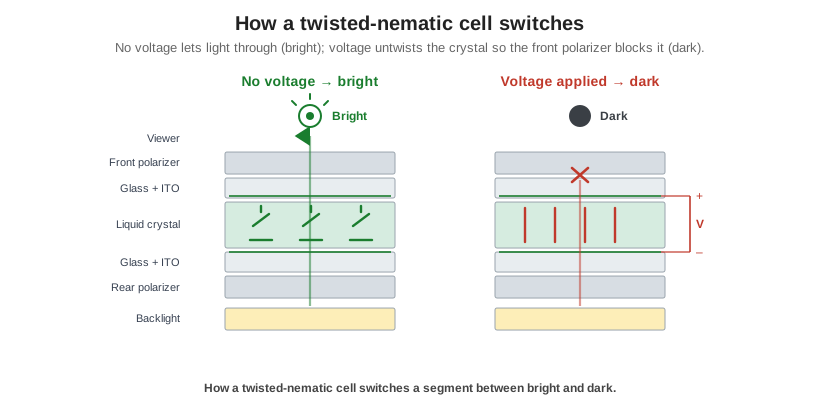
An LCD places the liquid crystal layer between two crossed polarizers. In the most common type, the twisted nematic (TN) cell, the molecules are arranged in a quarter turn from one face of the cell to the other. As light passes through, the twisted molecules rotate its vibration by 90 degrees, just enough to line it up with the second polarizer and pass through. The area looks clear or lit.
Apply a small voltage across that area and the molecules straighten out to follow the electric field. They no longer twist the light, so the second polarizer blocks it and the area goes dark. Switch the voltage off and the molecules relax back into their twist. That switch, clear to dark and back again, is the basic action behind every LCD. Whether “voltage on” looks dark or light depends on how the polarizers are arranged, which is the difference between positive and negative display modes.
What is inside an LCD?
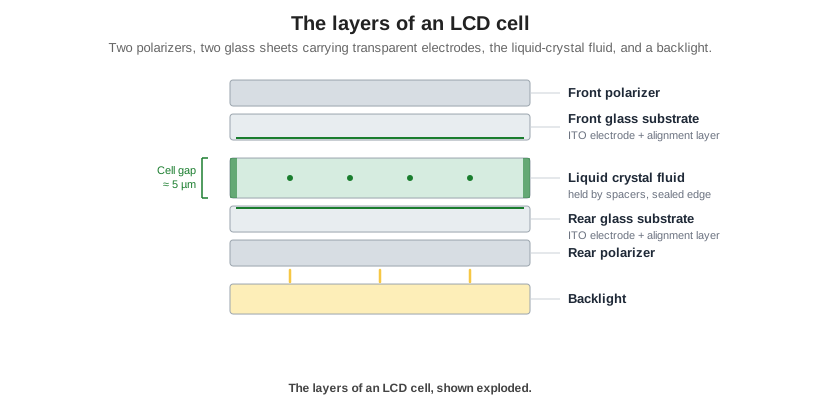
An LCD cell is a thin sandwich, usually only a few millimeters thick.
- Two glass substrates form the front and back of the cell.
- A transparent conductive coating, indium tin oxide (ITO), is patterned onto the inside of each glass layer to form the electrodes that switch each segment or pixel.
- An alignment layer on each inner surface sets the resting direction of the liquid crystal molecules.
- The liquid crystal fluid fills a very thin gap between the plates, typically around five microns, held to a precise thickness by tiny spacers.
- A seal around the edge keeps the fluid in.
- Polarizer films are laminated to the outer surfaces of the glass.
- A backlight sits behind the cell when the display needs to be readable in the dark.
The precision of that cell gap matters more than its size suggests. A few microns of variation changes contrast and color, which is why building displays is as much about process control as design.
Monochrome or color
A plain LCD is monochrome. It switches light on and off but does not create color. To make a color display, a color filter with red, green, and blue stripes is added, and each pixel is built from three sub-pixels. Mixing the brightness of those three produces the full range of colors. Color filters and the finer control they need are the main reason color displays cost more and draw more power than monochrome ones.
Passive or active matrix
How the pixels are switched divides LCDs into two families.
| Passive matrix | Active matrix (TFT) | |
|---|---|---|
| Switching | Rows and columns scanned in sequence | One transistor per sub-pixel |
| Typical use | Segment, character, graphic monochrome | Full-color displays |
| Strengths | Low cost, low power, simple | Fast, high contrast, high resolution |
| Trade-offs | Slower, limited size and detail | Higher cost and power |
Passive displays cover a large share of industrial and appliance use, where a crisp monochrome readout is all a product needs. Active-matrix TFT displays power everything that needs full color and motion. The way each type is driven is worth its own explanation, covered in how LCDs are driven.
The strengths and limits of LCDs
LCDs earned their place for good reasons. They are mature and inexpensive, they last for years, they come in almost any size, and reflective versions can run for months on a coin cell because they use ambient light instead of a backlight. Sunlight-readable versions stay visible outdoors where many displays wash out.
They also have real limits, and an honest view of them makes for better design decisions. An LCD does not emit light, so it needs either a backlight or a well-lit environment. Simple TN displays lose contrast when viewed off-axis. Cold temperatures slow the liquid crystal response and heat can wash out contrast, so the operating range has to match the environment. Compared with OLED, an LCD has lower contrast and a narrower viewing angle, though it wins on brightness, cost, lifetime, and outdoor readability, which is why it remains the default for industrial and instrument use.
Choosing an LCD for your product
Most display decisions come down to three questions. Does the product need color, which points to TFT, or will monochrome do? Will it be read in the dark, in a lit room, or in direct sunlight, which decides between transmissive, reflective, and transflective versions? And what temperature range does it have to survive? Those three answers narrow the field quickly.
Orient Display designs and builds custom LCDs at every level, from bare glass to finished modules, with US-based engineering support and no minimum order quantity. Explore the LCD product line or character LCD modules, and when you are matching a display to a product you can start a custom project.