

Positive vs Negative LCD Display Modes
Positive and negative are the two basic display modes an LCD can use. Positive mode shows dark characters on a light background and stays readable in bright light, often with no backlight at all. Negative mode shows light characters on a dark background and needs a backlight to be seen. The right choice is set by where the product is used and whether it can carry a backlight, not by which one looks better in the abstract. If you are new to how a cell forms an image, start with what an LCD is and how it works.
Part of the Display Fundamentals knowledge hub.
Positive vs negative at a glance
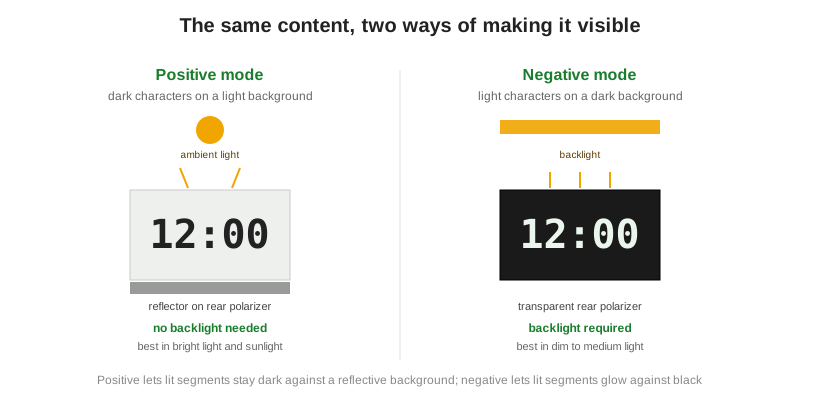
The two modes invert which pixel state is opaque. In positive mode a pixel is opaque when it is on, so dark characters sit on a light background. In negative mode a pixel is transparent when it is on, so lit characters glow against a dark background. That single difference drives the backlight, power, and lighting requirements below.
| Attribute | Positive mode | Negative mode |
|---|---|---|
| Appearance | Dark characters on a light background | Light characters on a dark background |
| Lit pixel | Opaque when on | Transparent when on |
| Backlight | Often none; optional | Required |
| Best ambient light | Bright to direct sunlight | Dim to medium |
| Typical rear polarizer | Reflective or transflective | Transmissive |
| Power draw | Lower; can run on ambient light | Higher; backlight stays on |
| Typical look and use | Utilitarian: calculators, meters, watches, instruments | Premium or color-accent: automotive, audio, control panels |
How the two modes work
A positive display leans on reflected ambient light. A reflector bonded to the rear polarizer sends incoming light back to the viewer, so the large light background makes the dark segments stand out, and no backlight is required. A negative display does the opposite. Its rear polarizer is transparent, so the dark background stays dark until a backlight shines through the lit segments and makes them glow. This is why a positive readout sharpens as light increases while a negative one can wash out in bright sun. The mode you pick is really a choice about your light source, which connects directly to reflective, transmissive, and transflective polarizers.
The polarizer and reflector behind the modes
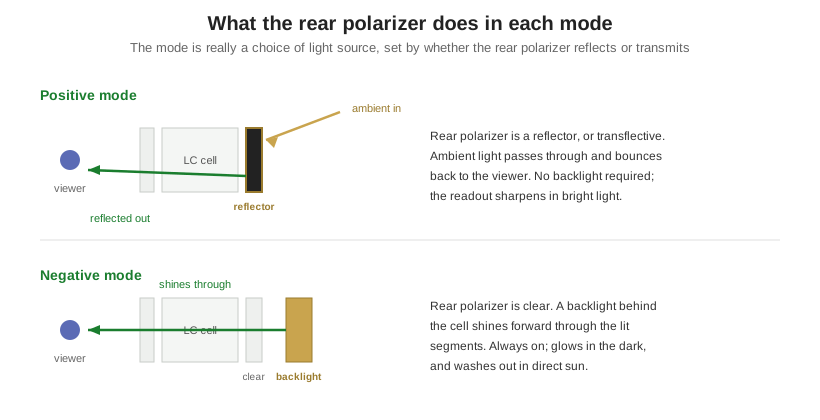
The difference between the two modes is built into the rear polarizer, the layer behind the liquid-crystal cell. In positive mode that rear polarizer is reflective, or transflective. Ambient light entering the front passes through the cell, reflects off the back, and returns to the viewer. The reflected background is bright, and the segments that block light read as dark against it. Because the display makes its own contrast from ambient light, it needs no backlight and gets sharper as the surroundings get brighter, which is what makes positive mode the default for anything used outdoors or on a tight power budget.
In negative mode the rear polarizer is clear, so there is nothing to reflect ambient light. The background stays dark until a backlight behind the cell shines forward through the segments that are switched on, and those segments glow. That is why a negative display must carry a backlight, and why it can wash out in direct sun, where ambient light overwhelms the backlit segments. Seen this way, the mode is a decision about the light source as much as the look: positive harvests the light that is already there, negative supplies its own.
Which mode fits your lighting and product
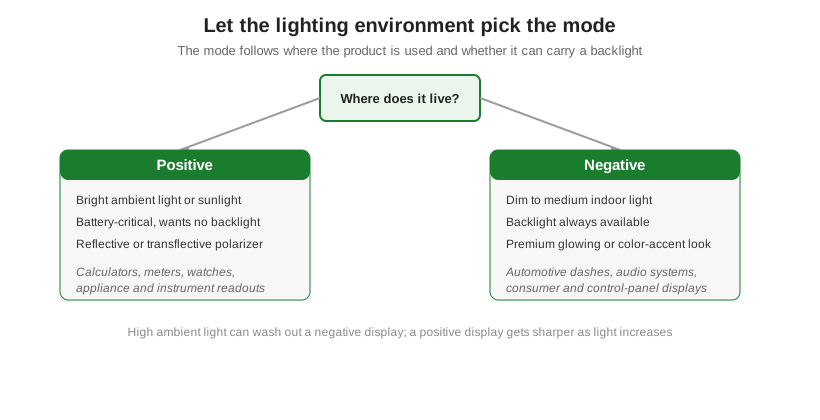
A common assumption is that negative looks more modern, so it must be the better choice. It is not that simple. Negative displays demand a backlight that is always on, which adds power draw and can disappear in sunlight, while positive displays get cheaper, run longer on a battery, and get more readable outdoors. Choose by environment first. Bright or outdoor use and tight power budgets point to positive. Dim indoor use with a premium glow or colored accents points to negative. Color choices then follow the mode, covered in how LCD color works.
Adding a backlight: transflective positive vs always-on negative
The two modes treat the backlight differently, and that often settles the choice. A negative display cannot work without one, so the backlight is a fixed cost in power and space and must run whenever the display is read. A positive display starts with no backlight at all, but you can add an optional one by specifying a transflective rear polarizer instead of a fully reflective one. That gives a positive transflective display that reads on ambient light by day, with the backlight switched on only in the dark, which is the low-power way to stay readable around the clock. For a product that lives both outdoors and in the dark, this is usually a better answer than negative mode. The backlight itself, its technology, color, and brightness, is a separate choice covered in LCD backlight types.
Orient Display builds both modes across TN, STN, and FSTN glass and can match the polarizer, backlight, and color to the environment your product ships into; see the LCD product line.