

Blog
The Minimum Display Resolution Required for Barcode Scanning

Types of Barcodes
The types of barcodes can be divided into two main categories:
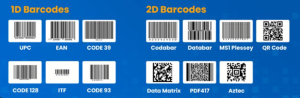
1. One-Dimensional Barcodes (1D Barcode)
Features:
Encodes data only in the horizontal direction, suitable for short sequences of numbers or letters. Commonly used in retail, logistics, and industrial systems.
| Barcode Type | Features | Common Uses |
| EAN-13 / EAN-8 | Numeric only (0–9), includes a check digit; international standard for retail barcodes | Supermarkets, retail products |
| UPC-A / UPC-E | North American standard, similar to EAN | Retail packaging |
| Code 39 | Supports letters, numbers, and some symbols; variable bar width | Industry, warehousing, military |
| Code 128 | High density, supports full ASCII; encodes long strings | Logistics, healthcare, tickets |
| Interleaved 2 of 5 (ITF-25) | Numeric only; interleaved structure | Carton codes, shipping packages |
| Codabar | Numbers + specific start/stop characters (A–D) | Libraries, blood banks, legacy systems |
| MSI / Plessey | Numeric, older format | Internal retail systems |
Common selection recommendations:
- For retail products → use EAN-13 / UPC-A
- For internal codes, warehousing, or custom text → use Code 128 (most versatile)
2. Two-Dimensional Barcodes (2D Barcode)
Features:
Encodes information in both horizontal and vertical directions, allowing much more data storage. Most can be scanned by smartphones.
| Barcode Type | Features | Common Uses |
| QR Code | Most widely used; supports numbers, letters, Chinese characters, and binary; built-in error correction | Payments, URLs, product traceability |
| Data Matrix | Compact size, high error correction, easily recognized by industrial cameras | Chips, electronic components, medical devices |
| PDF417 | Stacked linear format, can encode long text | Boarding passes, ID cards, logistics labels |
| Aztec Code | No need for an external quiet zone, suitable for small areas | Tickets, mobile interfaces |
| MaxiCode | Developed by UPS for logistics | International parcel sorting systems |
Common selection recommendations:
- For smartphone scanning → QR Code
- For factory, metal, or small component marking → Data Matrix
3. How to Choose
| Application | Recommended Barcode Type |
| Retail sales (recognized by POS systems) | EAN-13 / UPC-A |
| Internal asset or workstation labeling | Code 128 |
| Mobile scanning (URLs, info display) | QR Code |
| High-density, small-size, industrial scanning | Data Matrix |
| Very limited printing space but still scannable | Aztec |
Barcode Display Resolution Requirements
1. Concept of PPI
PPI (Pixels Per Inch) refers to the number of pixels contained in one inch (25.4 mm) of display length.
It indicates the pixel density or level of detail of the screen — the higher the PPI, the denser the pixels, and the smoother and sharper the images and text will appear.
Formula:
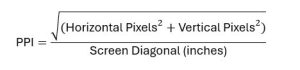
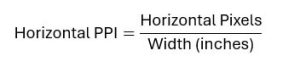
Alternatively, for one direction (horizontal or vertical):
Example: Orient Display E-Paper AES200200A00-1.54ENRS
- Active Area (AA): 27 mm × 27 mm (≈ 1.063 in × 1.063 in)
- Resolution: 200 × 200 pixels
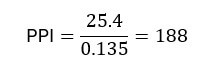
- Pixel Pitch: 0.135 × 0.135 mm
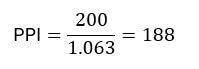
Or equivalently, using pixel pitch:
Quick Reference Table
| Pixel Pitch | Equivalent PPI |
| 10 mil (0.254 mm) | 100 ppi |
| 7.5 mil (0.191 mm) | 133 ppi |
| 6.5 mil (0.165 mm) | 154 ppi |
| 5 mil (0.127 mm) | 200 ppi |
| 2.5 mil (0.064 mm) | 400 ppi |
2. Resolution Requirements for Common 1D Barcodes
a. EAN-13 / EAN-8 / UPC-A / UPC-E (Retail Codes)
- Typical X dimension: 0.33 mm (13 mil)
- Recommendation: Minimum 2 pixels per narrow bar
- Required PPI:
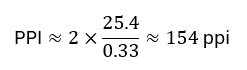
- Practical Recommendation:
≥ 150 ppi usable, ≥ 200 ppi preferred- At 27 mm active area:
- 150 ppi → ~160×160 px
- 200 ppi → ~213×213 px
- At 27 mm active area:
b. Code 128 (Logistics / Internal Encoding, Very Common)
- Typical X dimension: 0.25 mm (10 mil)
- Required PPI:
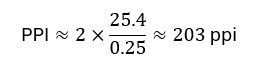
- Recommendation:
≥ 200 ppi preferred, especially for longer codes.
At ~150 ppi, the barcode must be enlarged and simplified to avoid crowding.
c. Code 39, ITF-25, Codabar, MSI, etc.
- Lower density, mostly for internal management.
- Typical X dimension: 0.33–0.5 mm
- Recommended PPI: ≥ 120–150 ppi
- Practical Note:
150 ppi is generally sufficient; less demanding than Code 128.
3. Resolution Requirements for 2D Barcodes
2D barcodes rely on module size (the smallest square unit). Each module should ideally be represented by at least 2 pixels.
a. QR Code
- Typical module width: 0.3–0.5 mm
For 0.3 mm modules:

- Recommendation:
Minimum ~170 ppi, recommended ≥ 200 ppi- On a 27 mm, 200 ppi display → ~213×213 px — sufficient for medium-size QR codes.
b. Data Matrix
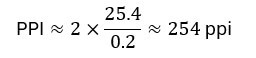
- Used for small components and chips; modules can be very small (0.2–0.3 mm).
- For 0.2 mm modules:
- Recommendation:
≥ 250 ppi suitable, 300 ppi preferred for industrial use.
If the screen is only 200 ppi, enlarge the Data Matrix (module ≥ 0.25–0.3 mm).
c. PDF417 / Aztec Code
- High-density symbologies; require higher pixel density.
- PDF417: ≥ 200–250 ppi recommended
- Aztec: ≥ 200 ppi minimum; 300 ppi preferred when space is limited
4. Summary for 27 mm × 27 mm E-Paper Displays
| Barcode Type | Minimum Usable PPI | Recommended PPI | Recommended Pixels (27 mm area) |
| EAN / UPC | ≥150 ppi | 200 ppi | ≈ 213×213 |
| Code 39 / ITF-25 | ≥150 ppi | 200 ppi | ≈ 213×213 |
| Code 128 | ≥200 ppi | 250–300 ppi | 213×213 / 320×320 |
| QR Code | ≥170 ppi | 200–300 ppi | 213×213 / 320×320 |
| Data Matrix | ≥250 ppi | 300 ppi | ≈ 320×320 |
| PDF417 / Aztec | ≥200 ppi | 250–300 ppi | ≥ 213×213 |
If you have any questions, please contact our engineering.