

Display Connector and Pinout Basics
Every display module has to physically connect to a host board, and a handful of conventions cover almost all of them: an FPC tail or FFC cable into a ZIF connector, or a pin header for the older parts. This is the lookup for those conventions, the pitch values, the FPC construction, and the assembly mistakes that cost a build. For the signal side of the pinout table see how to read a display datasheet, and for the connector terms see the display glossary.
Part of the Reference knowledge hub.
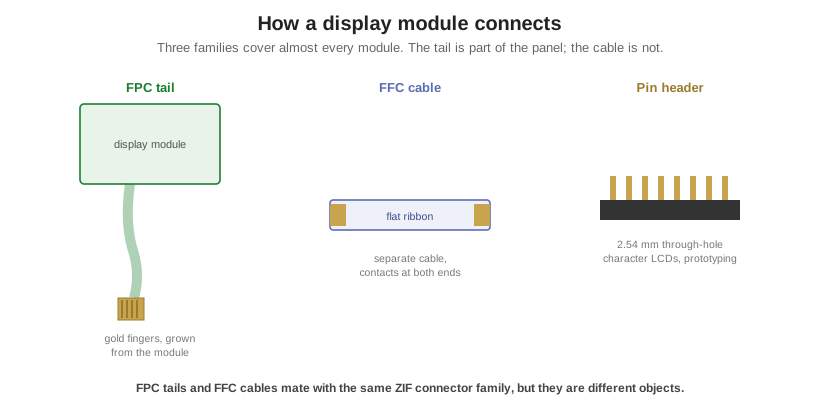
Connection types
- FPC tail: a flexible printed circuit that is an integral extension of the module. The panel’s own traces continue onto a polyimide tail ending in exposed gold fingers, which slide into a mating connector. Dominant on modern TFT, OLED, and touch, because it saves space and removes a connector from the panel.
- FFC cable: a separate, detachable flat ribbon with contacts at both ends, used to bridge two connectors. The key distinction: an FPC tail is grown from the module, an FFC is a standalone cable. Both mate with the same connector family, so it is often called “FFC/FPC.”
- Pin header: a row of 2.54 mm through-hole pins. Classic on character LCDs and breakout boards, robust and hand-solderable, but bulky and low density. Used where ruggedness and easy prototyping beat compactness.
- ZIF connector: the zero-insertion-force connector on the host board. Open, and the contacts do not touch the cable; the tail slides in with no force, then an actuator clamps it. The standard for fine-pitch flex, and removable and reworkable.
- Solder-down and LIF: a solder-down (hot-bar) FPC is permanently bonded to the PCB, the most rugged and lowest-profile option with no rework, for high-vibration or ultra-thin products. LIF (low insertion force) holds by friction only, cheapest but poor retention under vibration.
- Board-to-board: mated header and receptacle pairs that stack two rigid PCBs directly, no cable, down to 0.35 mm pitch. Used in stacked display-on-mainboard assemblies.
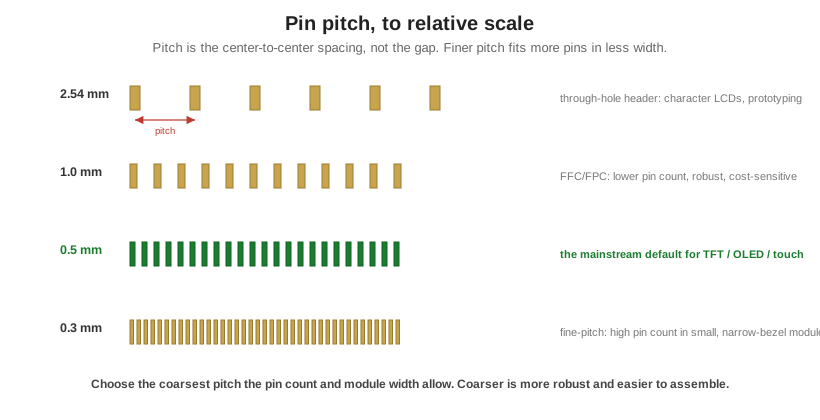
Pin pitch
Pitch is the center-to-center distance between adjacent contacts, not the gap between them; this is the single most common misread. Four values anchor the whole field, and on display FPCs you will almost always meet 0.5 mm or 1.0 mm. The rule is simple: finer pitch fits more pins in less width, at the cost of fragility and tighter tolerance, so choose the coarsest pitch the pin count and module width allow.
| Pitch | Family | Typical use |
|---|---|---|
| 2.54 mm (0.1 in) | Through-hole header | Character LCDs, breakouts, prototyping |
| 1.0 mm | FFC/FPC, ZIF | Lower pin count, robust, cost-sensitive flex |
| 0.5 mm | FFC/FPC, ZIF | The mainstream default for TFT, OLED, and touch |
| 0.3 mm | FPC, fine-pitch ZIF | High pin count in small, narrow-bezel modules |
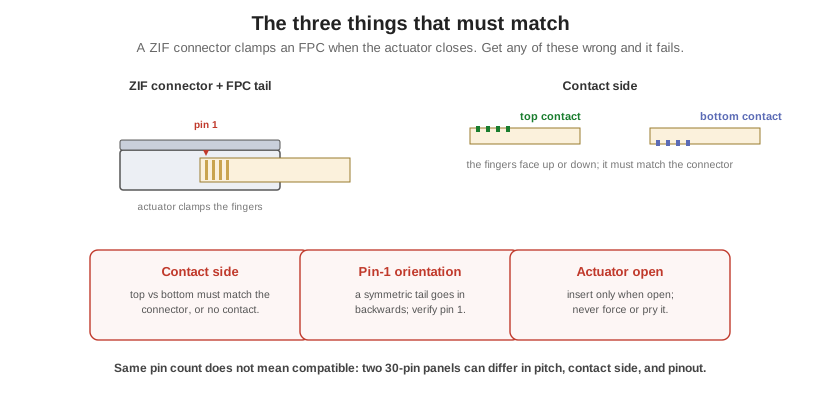
FPC construction: contacts, stiffener, pin 1
Three details on the tail decide whether it connects. Contact side: the gold fingers are exposed on one face only, top contact (facing up) or bottom contact (facing the PCB), and this must match the connector’s contact style or you get an open or intermittent joint. Stiffener: a rigid backing laminated to the back of the fingers, giving the flimsy flex the thickness and rigidity to seat and clamp correctly; on the wrong side it pushes the fingers against the wrong surface. Pin 1: marked on the tail by a number, triangle, notch, or cut corner, and defined in the drawing. Orientation is not self-correcting, so a symmetric tail can go in backwards, mis-mapping every signal and possibly powering the wrong rail. And note that contact count is a mechanical statement: a connector may include dummy, shield, or no-connect positions, so the number of functional signals can be lower than the position count. The datasheet pin table is the electrical truth; the mechanical drawing gives the positions, pin-1 marker, and contact side.
ZIF connectors and the assembly gotchas
A ZIF connector makes its connection when the actuator clamps, not when the cable slides in. Actuators come in two styles that are easy to confuse with contact side but are independent of it: a flip lock hinges up to open and down to clamp, while a slide lock draws a bar outward to open. Keep actuator style and contact side separate in your head; a connector has one of each. The failures here are the most common in field assembly: inserting the cable while the actuator is still closed shears the fingers; over-rotating or prying the delicate actuator snaps it; a top or bottom contact mismatch gives no contact at all; a reversed pin 1 mis-maps every signal; and under-insertion leaves the fingers short of the contact zone. Insert only when the actuator is open, never force, and verify pin 1 and contact side against the datasheet.
Typical pin counts by module
These are typical, de-facto ranges, not standards. The recurring trap is that connector position count is not interface signal count: power, ground, backlight, touch, and control pins pad the connector well beyond the raw data lines, so an LVDS panel has far more pins than differential pairs. Even the well-known “40-pin RGB” is a convention, not a guarantee; pinouts are similar across vendors but the datasheet governs.
| Module type | Typical pins | Notes |
|---|---|---|
| Character LCD (16×2, 20×4) | 14, or 16 with backlight | 2.54 mm header; pins 15–16 are the LED backlight |
| Small SPI TFT (ST7735, ILI9341) | ~8 to 20 | SPI is ~4–5 signals; the rest are power, backlight, touch, SD |
| RGB / parallel TTL TFT (3 to 10 in) | 40-pin FPC, 0.5 mm (de-facto) | 24 RGB data + PCLK/HSYNC/VSYNC/DE + backlight, touch, power |
| LVDS industrial panels | 20 / 30 / 40 / 50-pin | Exceeds the data-pair count; power, PWM, EDID, touch, GPIO |
| MIPI DSI | ~6 to 10 signals in a 30–40-pin FPC | 1–4 data lanes + clock; serial, so few signals |
With an off-the-shelf module you accept its tail and pinout; with a custom build the connector, tail geometry, pitch, and pinout are designed around your board. Orient Display can set the FPC tail length, width, and exit direction to fit an enclosure, define the pin assignment and interface to match the host, choose pitch, contact side, and ZIF versus solder-down for the product’s density and ruggedness, and call out the stiffener, pin-1 marking, and mating connector on the drawing to head off the assembly failures above. For the parts behind these tails see the TFT and LCD lines.