

Display Controller and Driver ICs
Behind the glass of almost every embedded module are one or two chips that turn a logic bus into the voltages that switch the display: a driver and, in most graphic modules, a controller. Telling the two apart explains most of what a module datasheet lists, and it is the difference between a part a small microcontroller can drive and one that needs a full graphics host. For how the underlying panel is switched, see How LCDs Are Driven.
Part of the Embedded Displays knowledge hub.
Driver versus controller
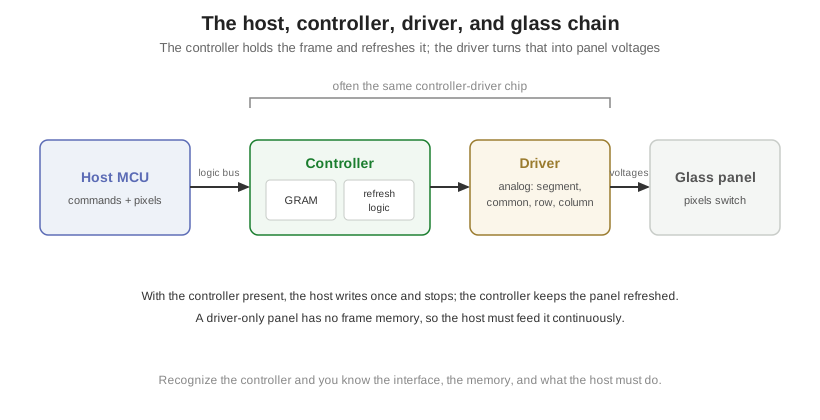
A driver IC is the analog part. It generates the segment, common, row, and column voltages that actually switch the pixels, at the levels and timing the glass needs. A small segment or character display may have nothing but a driver, and the host has to feed it continuously.
A controller is the digital part in front of the driver. It holds the image in on-chip memory, refreshes the panel from that memory on its own, and exposes a simple bus to the host. With a controller in the module, the host writes a pixel or a command and walks away; the controller keeps the display lit. Many graphic modules combine both functions in one controller-driver chip, which is why the datasheet often lists a single part number that does both jobs.
Graphics RAM and why it matters
The memory inside a controller, its graphics RAM or GRAM, is the reason a low-end MCU can drive a real graphic display. The controller stores the full frame, so the host only sends the pixels that change and the controller handles the constant refresh. A driver-only panel has no memory, so the host must regenerate and clock out every frame without pause, which ties up a timer and a chunk of the processor.
That single feature sets the class of host a display needs. A module with a controller and GRAM runs from an 8-bit MCU over a couple of wires. A panel without one needs a host with a display peripheral and the bandwidth to feed it, which is a different and larger processor.
How the chips attach: COG, COB, and COF
Where the IC physically sits is part of the module spec, because it sets the module’s size and its flex. Chip-on-glass (COG) bonds the driver directly onto the display glass, which is the most compact and the most common in modern modules. Chip-on-board (COB) mounts the chip on a small PCB behind the glass, which is sturdier and easier to rework but adds thickness. Chip-on-flex (COF) puts the chip on the flexible tail, keeping the glass clean and the connection thin, common where the tail folds behind the display.
The interface the controller exposes
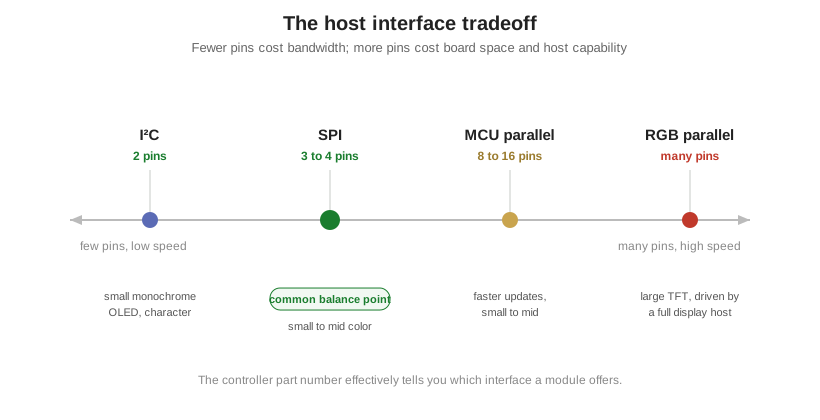
What the host sees is the controller’s bus, and the choice of bus is a tradeoff between pin count and speed. The controller part number effectively tells you which is available.
| Interface | Pins | Speed | Typical use |
|---|---|---|---|
| I²C | 2 | Low | Small monochrome OLED and character displays |
| SPI | 3 to 4 | Moderate | Small to mid color TFT and OLED |
| MCU parallel (8080 / 6800) | 8 to 16 plus control | Higher | Faster updates on small to mid displays |
| RGB parallel | Many | Highest | Larger TFT, driven by a host with a display controller |
Fewer pins cost bandwidth, more pins cost board space and host pins. A small status display is happy on two I²C wires; a large, fast TFT needs the wide RGB bus and a host built to drive it. Most small color modules land on SPI as the balance point.
Reading it on a datasheet
In practice the controller part number is the shorthand. A small monochrome OLED usually names a controller in the SSD family on I²C or SPI; a small color TFT usually names an ILI or ST controller with GRAM on SPI or MCU parallel. Once you recognize the controller, you know the interface, whether the module carries its own frame memory, and therefore what the host has to do. That is most of what the embedded side of a display spec comes down to.
Orient Display builds LCD and TFT modules with the controller and driver matched to the glass, so a chosen interface and host size are met by the module rather than left to the board.