

Display Operating Temperature
Every display datasheet lists two temperature ranges, and reading them wrong is one of the most common and expensive spec errors in a design. Temperature governs a liquid crystal display directly, because the liquid crystal is a fluid whose behavior changes with heat and cold: too cold and it turns sluggish or freezes, too hot and it loses contrast or blanks out entirely. The good news for a custom build is that the operating range is a design choice, not a fixed property, set by the fluid, optional heaters, and rated materials. This article explains what the two ranges mean, what actually happens at each extreme, and how a wide-temperature display is built and specified.
Part of the Design and Integration knowledge hub.
Operating vs storage temperature
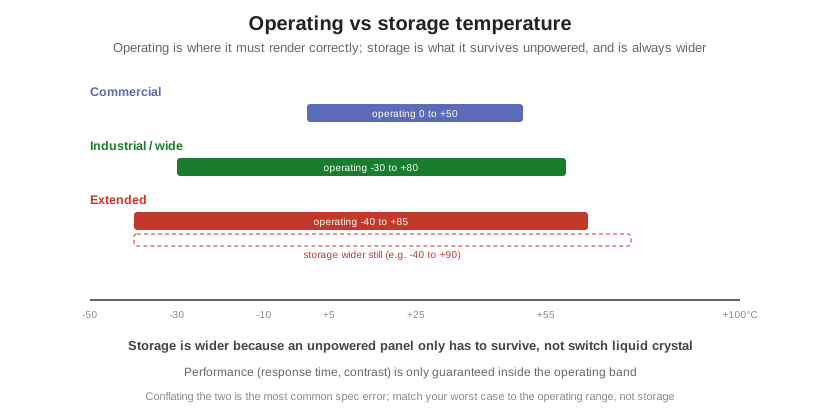
The operating temperature is the range in which the display is powered and expected to render a correct, legible image; response time and contrast are only guaranteed inside it. The storage (or non-operating) temperature is the range the module can survive unpowered without permanent damage, and it is always wider. Typical tiers run from commercial (roughly 0 to +50 C operating), through industrial or wide (about -20 or -30 to +70 or +80 C), to extended (-40 to +85 C), with storage ranges wider at both ends. Storage is wider for a simple reason: an unpowered panel is not trying to switch liquid crystal, hold an alignment, or drive electronics, so it only has to physically survive. The mistake to avoid is matching your environment to the storage range; match your real worst case to the operating range.
What cold and heat actually do
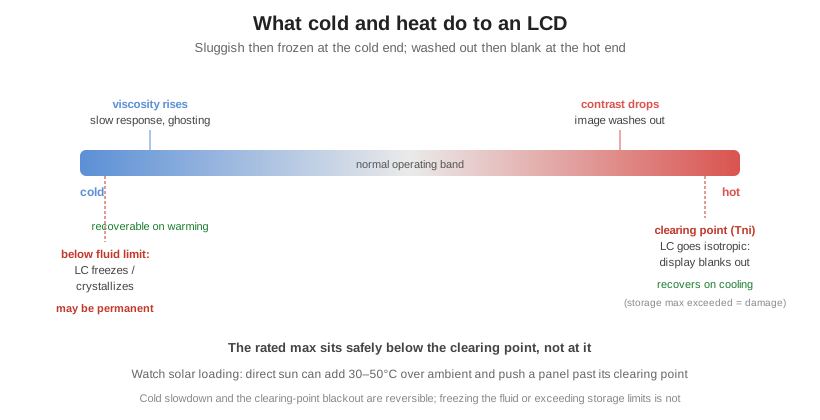
Cold makes the liquid crystal viscous and slow. As the temperature drops, the molecules reorient sluggishly, so response time stretches from milliseconds toward hundreds of milliseconds or more, producing visible ghosting and smearing, and contrast weakens. This slowdown is temporary and recoverable: warm the display and the speed returns. The hard limit is the freezing or crystallization point of the fluid, below which the liquid crystal can freeze and the cell can be permanently damaged, which may not recover. The two cold regimes are different: recoverable sluggishness above the fluid limit, potential permanent damage below it. Cold also invites condensation on the glass when a cold panel meets warm, humid air.
Heat first drops contrast and washes the image out. The governing point is the clearing point, or Tni, the temperature at which the liquid crystal loses its ordered nematic phase and becomes an ordinary isotropic liquid; past it the material can no longer control light and the display goes blank, the effect often called blackout or blackening. It is worth stating precisely: the clearing point is a property of the specific liquid-crystal mixture, and the datasheet’s maximum operating temperature is set deliberately below it, by roughly 10 degrees, not at it. That blackout is usually reversible once the panel cools. What is not reversible is exceeding the storage maximum, which permanently damages polarizers, adhesives, and driver ICs. A frequent field trap is solar loading: direct sun can add 30 to 50 C to a surface over ambient, pushing a display past its clearing point on an otherwise moderate day.
How a wide-temperature display is built
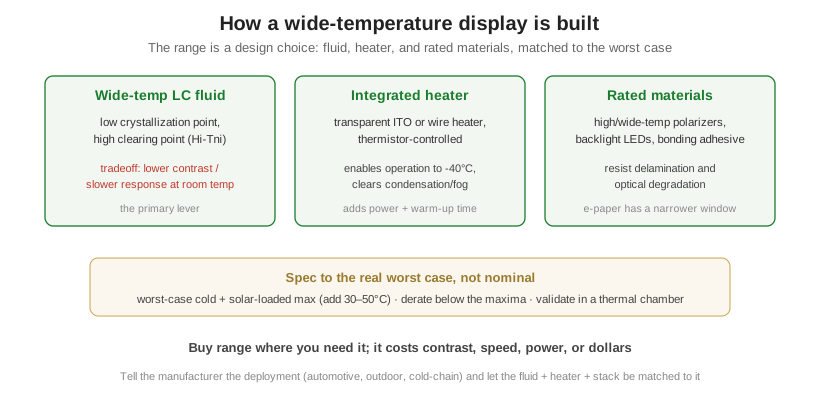
Three levers extend the range. The primary one is the fluid: formulators choose a wide-temperature (Hi-Tni) mixture with a low crystallization point and a high clearing point, which buys range at the cost of lower contrast and slower response at room temperature. For reliable cold operation, a transparent ITO film heater or a wire heater is laminated into the stack and controlled by a thermistor, warming the panel above the fluid’s usable threshold; this enables operation down to -40 C and clears condensation, at the cost of power draw and warm-up time. Finally, the surrounding materials, the polarizers, the backlight LEDs, and any bonding adhesive, must themselves be rated for the extremes to avoid delamination and optical degradation. One note on technology: e-paper has a narrower usable window than LCD because its electrophoretic ink is strongly temperature-dependent, so cold dramatically slows its refresh.
Specifying for your application
Specify against the real worst case, not the nominal one. Assume solar loading for anything outdoors or in a vehicle, and add 30 to 50 C to the ambient maximum. Practice derating, designing with margin below the rated maxima rather than at them, and validate with thermal-chamber testing across the full operating and storage range, including power-on-when-cold and solar-soak scenarios, before committing.
| Condition | What happens | Recoverable? |
|---|---|---|
| Cold, above fluid limit | Slow response, ghosting, lower contrast | Yes, on warming |
| Cold, below fluid limit | LC freezes / crystallizes | May be permanent |
| Hot, near clearing point (Tni) | Contrast fades, display blanks out | Yes, on cooling |
| Beyond storage maximum | Polarizers, adhesives, ICs damaged | No |
Because Orient Display builds custom modules, the operating range is something to design to rather than accept off the shelf: OD selects the wide-temperature fluid, integrates ITO or wire heaters with thermistor control, and specifies temperature-rated polarizers and backlights across LCD, TFT, and e-paper. Tell us the real deployment, worst-case cold, solar-loaded maximum, cold-chain, or automotive, and we match the fluid, heater, and stack to it, balancing range against room-temperature performance and cost. To spec a display for your temperature range, start a custom project or explore the sunlight-readable TFT line for outdoor builds.