

Resistive vs Capacitive Touch
Almost every touchscreen is one of two technologies, and they sense a touch in fundamentally different ways. Resistive touch responds to pressure: you physically push two conductive layers together. Capacitive touch responds to your body’s charge: your finger changes an electric field through a solid sheet of cover glass, with nothing to press. That one difference cascades into everything that matters when you choose, gloves, multi-touch, durability, clarity, cost, and how each behaves when the screen gets wet. This article explains how each works and when to use which, so you can match the panel to the way it will actually be used.
Part of the Design and Integration knowledge hub.
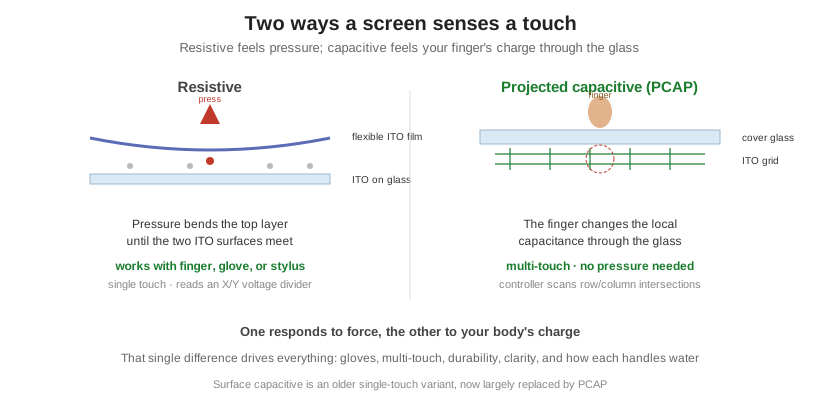
How resistive touch works
A resistive touchscreen is two transparent conductive layers, both coated with indium tin oxide (ITO), held apart by a thin air gap and a scatter of tiny insulating spacer dots. The top layer is a flexible film; the bottom is usually glass. When a finger, gloved hand, stylus, or any object presses hard enough, the top layer flexes until the two ITO surfaces touch at that point, closing a circuit. The controller reads the position as a voltage divider: it puts a voltage gradient across one layer and measures where along it the contact occurred, then repeats for the other axis. In a more robust five-wire design, the stable bottom glass carries the measurement for both axes and the flexible top sheet is only a probe, which is why five-wire panels survive roughly 35 million touches at a single point where a simpler four-wire lasts one to three million. Resistive is inherently single-touch, and because it senses force rather than conductivity, it works with literally anything that can push.
How capacitive touch works
The modern standard is projected capacitive, or PCAP: a grid of ITO row and column electrodes patterned on glass or film, with a solid cover glass over it acting as the dielectric. Your finger is conductive and grounded, so bringing it near the grid changes the capacitance the controller measures, and it does so through the cover glass with no pressure at all. There are two sensing modes. Self-capacitance measures each row and column against ground; it is fast but can report phantom points, so it is limited for true multi-touch. Mutual-capacitance measures every row-column intersection independently, which is heavier to scan but resolves each finger separately and is what enables reliable ten-point multi-touch. Because the electronics sit safely below the cover glass and there is nothing to wear out mechanically, PCAP handles well over 200 million touches and takes a hard, scratch-resistant glass front. (An older technology, surface capacitive, is single-touch and largely superseded; PCAP is what people mean by capacitive today.)
Head to head
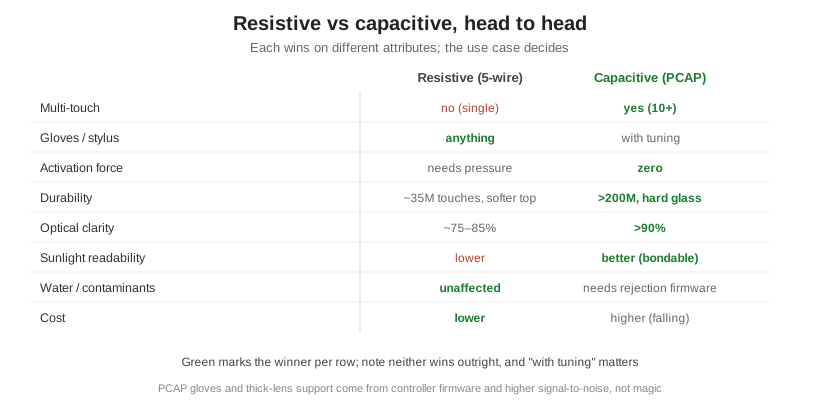
Neither technology wins outright; they trade. Capacitive gives multi-touch, a feather-light response, a hard glass surface good for over 200 million touches, higher optical clarity (above 90 percent transmittance versus roughly 75 to 85 percent for resistive), and it bonds well for sunlight readability. Resistive answers pressure from any object, so it works with heavy gloves and any stylus with no special tuning; it is unbothered by water, spills, and dust because it responds to force rather than conductivity; and it is cheaper, especially at low volume. The two most common misconceptions are worth correcting directly. Capacitive can work with gloves, but only with glove-mode firmware and a high-signal controller, not by default. And capacitive struggles with water on the surface unless the controller runs water-rejection firmware, whereas resistive simply ignores it.
| Attribute | Resistive (5-wire) | Projected capacitive |
|---|---|---|
| Multi-touch | No (single point) | Yes (10+ points) |
| Input types | Anything with pressure: bare/gloved finger, stylus | Conductive touch; gloves/stylus with tuning |
| Activation force | Needs light pressure | Zero force |
| Durability | ~35M touches/point, softer top | >200M touches, hard glass |
| Optical clarity | ~75–85% transmittance | >90% transmittance |
| Water / contaminants | Unaffected | Needs rejection firmware |
| Cost | Lower | Higher (falling) |
Which to choose
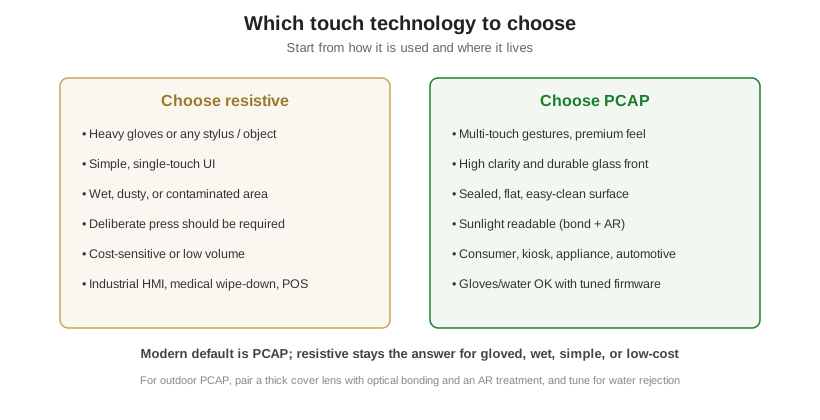
Choose resistive when the input is unpredictable or the setting is harsh in a simple way: heavy gloves, a stylus, wet or dusty environments, a UI that should require a deliberate press, or a tight budget, which is why it endures in industrial HMIs, wipe-down medical devices, and point-of-sale. Choose PCAP when the product needs multi-touch, a premium feel, high clarity, a durable and sealed glass front, or sunlight readability, which covers most consumer devices, kiosks, appliances, and automotive interfaces. Modern designs default to PCAP; resistive remains the right answer for the gloved, wet, simple, or low-cost cases.
Related from our blog
- Resistive vs capacitive touch panels compared
- Pros and cons of resistive touchscreens
- Pros and cons of capacitive touchscreens
The touch panel is only part of the stack. Cover-lens material and coatings sit above it, covered in cover glass and surface treatments, and for sunlight or rugged use the panel is usually optically bonded; the touch controller also connects over one of the host interfaces in display interfaces explained. Orient Display designs and builds both resistive and PCAP panels and integrates them with its LCD, TFT, and OLED modules, including custom cover lenses, glove and water-rejection tuning, and optical bonding for sunlight-readable assemblies. To spec touch for your product, start a custom project.