

LCD Color
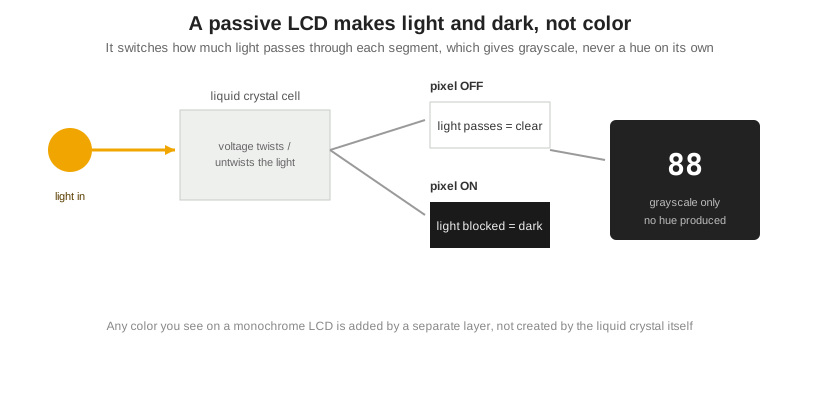
A passive LCD is monochrome by nature. The liquid crystal only switches how much light passes through each segment, which produces light and dark, never a color on its own. Any color you see on a monochrome display is added by a separate layer. There are three ways to do that: a fixed color layer such as a printed film, colored polarizer, or colored backlight; field-sequential color that lets a segment switch among colors; and an RGB color filter, which turns a neutral FSTN panel into a full-color CSTN display. For true full-color video and photos, you leave passive displays behind and move to TFT. The base cell all of this sits on is covered in what an LCD is and how it works.
Part of the Display Fundamentals knowledge hub.
Why a passive LCD is monochrome
The liquid crystal works by electrically controlled birefringence: voltage twists or untwists the crystal, which lets light through or blocks it. That mechanism can make a segment lighter or darker, but it has no way to pick a wavelength, so it cannot generate a hue. The natural output is grayscale. STN panels do show a faint yellow-green or blue cast, but that is an unwanted birefringence artifact, not real color, and FSTN adds a film to remove it, as covered in liquid crystal types. So to get color, you add something to the monochrome panel rather than change how the crystal works.
Three ways to add color
Each method adds more color capability and more cost. Fixed color puts set colors in set places. Field-sequential lets a segment change color. An RGB filter delivers full color. Whether a segment reads as dark-on-light or light-on-dark still follows the display mode in positive vs negative display modes.
| Method | How it works | Result | Relative cost | Typical use |
|---|---|---|---|---|
| Fixed color | Printed color film, colored polarizer, or colored backlight over a monochrome panel | Set colors in fixed positions | Lowest | Logos, warning icons, colored backgrounds and segments |
| Field-sequential | A segment is driven with a switching color source so it can change color | A few switchable colors per segment | Low to moderate | Status readouts that change color by state |
| RGB color filter (CSTN) | An RGB filter over a neutral FSTN panel | Full color, passive | Moderate | Simple full-color interfaces without fast video |
Where the color layer actually sits
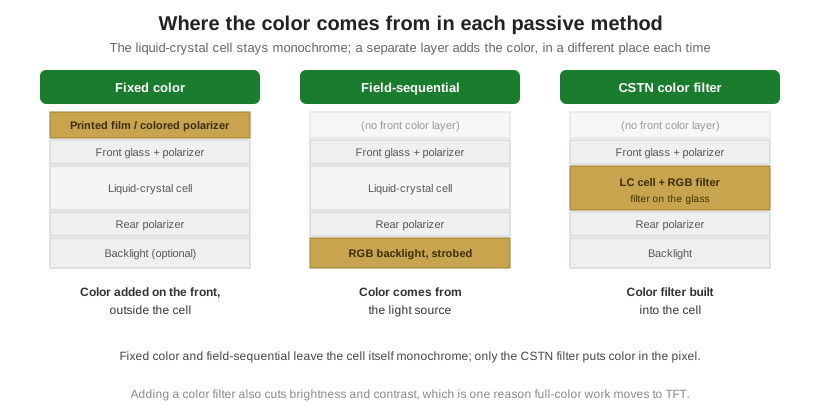
The three methods differ in one physical way: where the color-producing layer sits relative to the liquid-crystal cell. In fixed color the color lives outside the cell. A printed color film or a dyed polarizer is laminated to the front of the glass, or a colored LED or EL backlight is placed behind it, so set areas of the display take on a color while the cell underneath still only switches light and dark. Nothing about the cell changes; the color is painted on.
Field-sequential color moves the color into the light source. An RGB backlight is switched rapidly among red, green, and blue in step with the segment drive, so one segment can show different colors over time and the eye blends the fast sequence into a single color. The glass carries no color filter at all. CSTN takes the opposite approach and builds the color into the cell: a patterned array of red, green, and blue filter stripes is deposited on the inside of the glass and aligned to the pixels, so each pixel of a neutral FSTN panel becomes a red, green, or blue sub-pixel. That is the only one of the three where the color is part of the pixel itself, which is also why it is the most expensive to make.
Choosing a color approach, and when to move to TFT
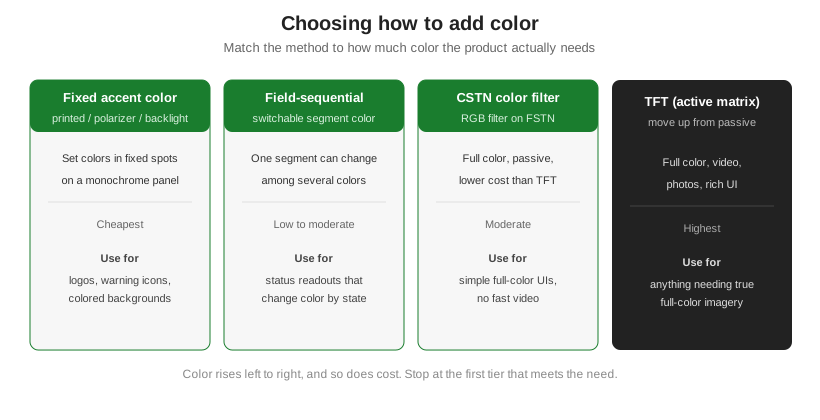
Start with the least color the product needs and stop there, because color and cost rise together. A colored accent or background is cheapest and covers logos, icons, and simple highlights. Field-sequential color suits a readout that should change color by state. CSTN gives a genuine full-color passive display for simple interfaces that do not run fast video. Once the product needs photographic images, video, or a rich moving interface, a passive panel cannot keep up and the right move is a TFT active-matrix display, where a transistor at every pixel drives true full color. That is a different product family, not a variant of monochrome color.
How many colors, and where passive color stops
How much color you get scales with the method. Fixed color gives a small, permanent set of colors in set places, which is all a logo or a warning icon needs. Field-sequential adds a handful of switchable colors per segment, but the rapid switching can show flicker or color break-up if the refresh rate is too low, and it draws more power to keep the sequence running. CSTN gives genuine full color from a passive panel, but the RGB filter absorbs roughly two-thirds of the light, so the display is dimmer and lower in contrast than the monochrome panel it started from, and passive multiplexing limits how fast it can refresh. That combination, dimmer and lower in contrast and slower, is the ceiling of passive color. When a product needs bright, saturated, fast full-color imagery, the answer is not a better passive trick but an active-matrix TFT, where a transistor at every sub-pixel holds the charge and drives a bright color filter without the multiplexing penalty.
Orient Display builds monochrome panels with printed and backlit color, CSTN color displays, and full-color TFT, so the color approach can match the product rather than force it; see the LCD product line.