

LCD Viewing Angle, Viewing Direction, and Contrast
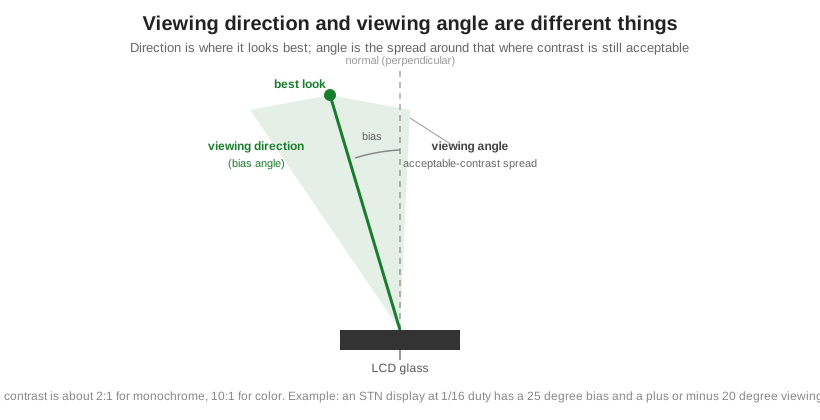
Two terms get mixed up constantly, and getting them right is the whole game with LCD readability. Viewing direction (also called the bias angle) is the single direction a display looks best from. Viewing angle is the spread on either side of that direction where the contrast is still acceptable. Viewing direction is set at manufacture and named by a clock position, like 6:00 or 12:00. Viewing angle is limited by the liquid crystal type and the duty cycle. You specify both to match how the product is mounted and used. For the cell these effects sit on top of, see what an LCD is and how it works.
Part of the Display Fundamentals knowledge hub.
Viewing direction and viewing angle are not the same thing
Because the usable viewing angle of a passive LCD is narrower than most people want, manufacturers deliberately offset the best-look direction from straight-on. That offset is the bias angle, or viewing direction. Around it sits the viewing angle: move your eye within that cone and contrast stays acceptable, move outside it and the image fades. Acceptable contrast is usually taken as about 2:1 for a monochrome display and 10:1 for color. A concrete anchor: an STN character display running at 1/16 duty has a 25 degree bias angle and a viewing angle of roughly plus or minus 20 degrees around it. Adjusting the contrast voltage shifts the effective direction somewhat but does not widen the viewing angle itself.
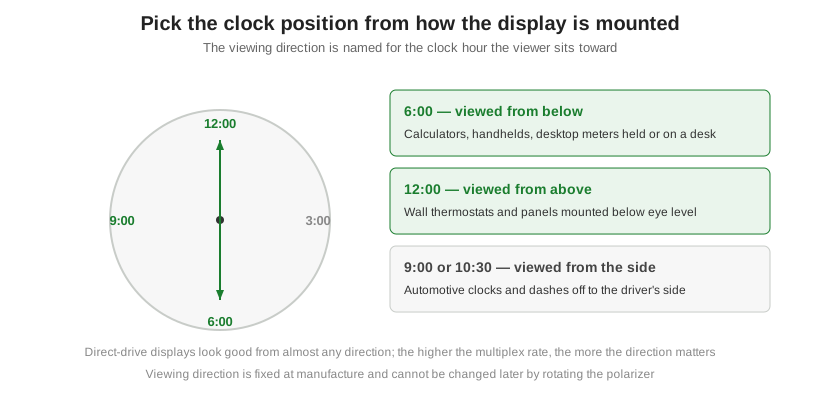
Clock positions: choosing 6:00, 12:00, or another direction
Viewing direction is named for the clock hour the viewer sits toward. A 6:00 display looks best from below the normal and suits things viewed from beneath, like a calculator on a desk or a handheld meter. A 12:00 display looks best from above and suits panels mounted below eye level, like a wall thermostat. Off-axis cases exist too: a car clock to the driver’s right might be a 9:00 or 10:30 part. The rule of thumb is to name the direction after where the eyes actually are. This matters far more as the multiplex rate climbs. A simple direct-drive display looks fine from almost anywhere; a densely multiplexed one is fussy about direction, which ties directly to liquid crystal type and multiplexing.
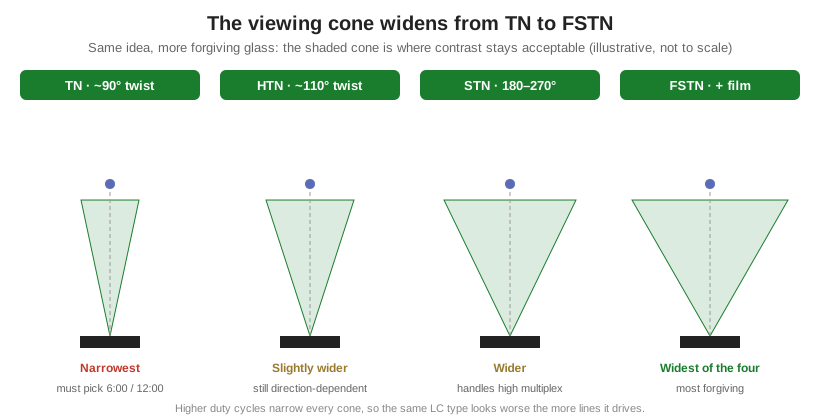
What sets the viewing angle: LC type and duty cycle
Two things govern how wide the viewing angle is: the liquid crystal type and the duty cycle. TN has a weak native viewing direction, which is exactly why a 6:00 or 12:00 direction has to be chosen for it. Moving up through HTN, STN, and FSTN widens the usable angle and improves contrast, with FSTN the most forgiving, especially at high multiplex rates. Higher duty cycles narrow the angle, so the same LC type looks worse the more lines it drives. The table gives the relative picture; absolute degrees depend on the specific duty cycle, so treat them as direction, not a spec.
| Type | Twist angle | Relative viewing angle | Viewing-direction dependence | Typical duty range |
|---|---|---|---|---|
| TN | ~90° | Narrowest | Strong; must specify 6:00 or 12:00 | Low, up to about 1/8 |
| HTN | ~110° | Slightly wider than TN | Strong | Low to moderate |
| STN | 180–270° | Moderate improvement | Moderate | Up to ~1/240 |
| FSTN | 180–270° + film | Widest of the four | Most forgiving | Up to ~1/240 |
Reading viewing angle on a datasheet
A datasheet states viewing angle as an angular range at a stated contrast ratio, measured from the viewing direction, and the contrast threshold matters as much as the number. Monochrome parts are usually specified at a contrast ratio of about 2:1 and color parts at about 10:1, so a wider-looking angle can simply reflect a looser threshold. Some datasheets give a single plus-or-minus figure around the bias axis; others give four numbers, for up, down, left, and right, because the cone is rarely symmetric. Read the angle together with the viewing direction it is measured from and the duty cycle it was measured at. The same panel quoted at 1/16 duty and at 1/100 duty shows a very different angle, so a number without its duty and contrast conditions is not comparable from one part to the next. When you compare two candidates, normalize them to the same contrast threshold and duty before trusting the degrees.
Widening the angle, and when to move to wide-view TFT
When the usable cone is too narrow for how the product is mounted, there are three levers to try before changing technology. Choose a more forgiving LC type, moving up toward FSTN. Lower the duty cycle if the format allows it. Add a compensation film to the front of the glass, which widens viewability at added cost, using the same optical thinking as the polarizer choice in reflective, transmissive, and transflective LCDs. Those cover most passive cases. When none of them is enough, for example a display that has to stay readable from every side of a room or from both front seats of a vehicle, the real answer is a wide-view active-matrix TFT built on an IPS or MVA cell, which holds contrast across a much larger cone than any passive panel can. That is a technology change, not a tuning change, and it is where a viewing-angle problem stops being an LC-and-duty question.
Orient Display sets the viewing direction and specifies the LC type for how a product is mounted, and builds the matching custom glass from concept to production; see the LCD product line.