

Standard Character LCD Configurations
Character LCDs are the small monochrome text displays on instruments, appliances, and controllers, specified as characters wide by lines tall: 16×2, 20×4, and a handful of others. Nearly every convention on this page, the sizes, the pinout, the addressing, the fonts, traces to one part: the Hitachi HD44780 controller and its clones. This is the lookup for the standard formats and their conventions. For the terms it uses see the display glossary, and for how these modules connect see the display interface quick reference.
Part of the Reference knowledge hub.
The standard formats
A single HD44780 drives up to 80 characters, which is the ceiling that decides what counts as standard. The two dominant formats are 16×2, the de-facto default, and 20×4, the largest single-controller format at exactly 80 characters.
| Format (cols × rows) | Standing | Typical use |
|---|---|---|
| 8×1 | Common | Tiny panels, handhelds, meters |
| 8×2 | Common | Compact instruments, small consumer devices |
| 16×1 | Common, tricky | Single-line readouts; most are wired 8+8 (see below) |
| 16×2 | Most common of all | The default: appliances, printers, front panels, maker boards |
| 16×4 | Less common | Four short lines |
| 20×2 | Common | Instruments, POS, medical, telecom |
| 20×4 | Very common | Menus, multi-line status, test gear, 3D printers |
| 24×2 | Moderate | Slightly wider 2-line panels |
| 40×1 | Less common | Long single-line labels and tickers |
| 40×2 | Common (large) | Long 2-line industrial displays; fills all 80 characters |
| 40×4 | Reference only | Over 80 characters, so it needs two controllers |
The HD44780 and DDRAM addressing
The HD44780U is the industry-standard character-LCD controller, and compatible clones (Samsung KS0066, Sitronix ST7066, Sunplus SPLC780, and others) share its instruction set as near drop-ins. Its display RAM (DDRAM) is 80 bytes, one per character, organized internally as two 40-character rows: row 1 at addresses 0x00 to 0x27, row 2 at 0x40 to 0x67. Note the gap between 0x27 and 0x40; the addresses are not contiguous. The controller only ever thinks in these two 40-character rows, so a physical layout is carved out of them and the firmware, not the controller, has to know the real geometry. The standard line-start addresses:
| Format | Line 1 | Line 2 | Line 3 | Line 4 |
|---|---|---|---|---|
| 16×2 / 20×2 / 24×2 / 40×2 | 0x00 | 0x40 | – | – |
| 16×4 | 0x00 | 0x40 | 0x10 | 0x50 |
| 20×4 | 0x00 | 0x40 | 0x14 | 0x54 |
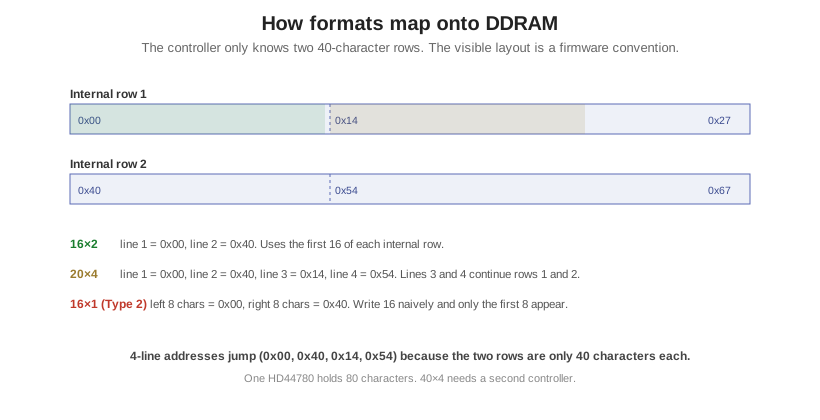
For a 4-line display, line 3 is the continuation of line 1 and line 4 the continuation of line 2, which is why 20×4 addressing jumps from 0x00 to 0x40 to 0x14 to 0x54 rather than running in sequence. And because DDRAM address is not screen position, writing past a line’s width does not wrap to the next visible line.
The 16×1 gotcha
“16×1” is not one thing, and this is the classic character-LCD trap. A true Type 1 (1×16) maps all sixteen characters to a single DDRAM row from 0x00, but these are less common. Most 16×1 modules are Type 2, internally an 8+8 display: the left eight characters live at 0x00 to 0x07 and the right eight at 0x40 to 0x47, and the module is initialized as a two-line display even though it has one physical row. Write sixteen characters straight through and only the first eight appear; the fix is to move the cursor to 0x40 after the eighth character. Check the datasheet before assuming contiguous addressing.
The 16-pin interface, 4-bit vs 8-bit, and I²C
The standard interface is the 16-pin header everyone searches for. It runs in 8-bit mode (all of D0 to D7, one byte per Enable pulse) or 4-bit mode (only D4 to D7, each byte sent as two nibbles with two Enable pulses), the latter saving four MCU pins and the more common wiring today. Control is RS (register select, command versus data), R/W (usually tied low to write), and E (the enable strobe). Where pins are scarce, a PCF8574 I²C backpack solders to the 16 pins and drops the host connection to four wires (VCC, GND, SDA, SCL), driving the LCD in 4-bit mode; modules commonly ship at I²C address 0x27 or 0x3F.
| Pin | Name | Function |
|---|---|---|
| 1 | VSS | Ground |
| 2 | VDD | Logic supply, +5V or +3.3V |
| 3 | V0 / VEE | Contrast, via potentiometer |
| 4 | RS | Register select, 0 = command, 1 = data |
| 5 | R/W | Read/Write, tie low to write |
| 6 | E | Enable strobe |
| 7–14 | D0–D7 | Data bus, D0–D3 unused in 4-bit mode |
| 15 | A (LED+) | Backlight anode |
| 16 | K (LED−) | Backlight cathode |
Fonts and custom characters
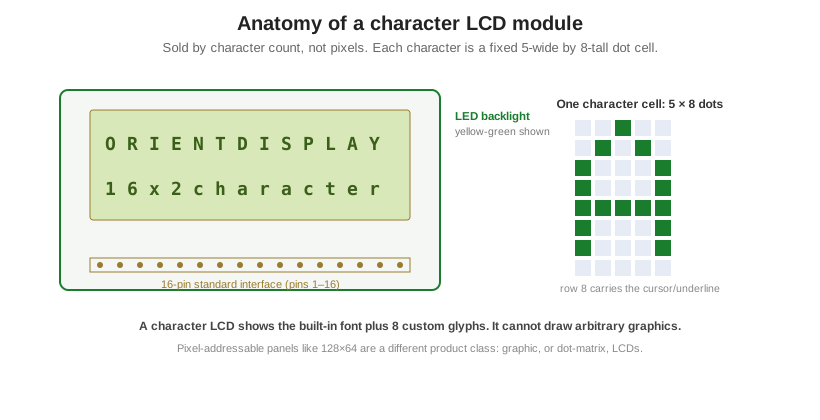
Each character is a 5×8 dot cell, the standard font (the visible glyph is 5×7 with the eighth row for the cursor or underline). A taller 5×10 font exists (some datasheets call it 5×11, counting the cursor row) but is only supported on certain modules, so treat it as the less-common option. The built-in font lives in CGROM, which comes in two common ROM variants, a Japanese katakana set (A00) and a European set (A02), whose maps differ, so portable code should not assume a specific table. On top of the fixed font, CGRAM gives 8 custom characters in the 5×8 font (or 4 in 5×10), addressed as character codes 0x00 to 0x07.
Choosing the build
Two decisions turn a character LCD into a spec: the format (how many characters by how many lines) and the readability build (where it has to stay legible). The readability side is a stack of choices: the LCD mode, usually STN for character parts; the polarizer, reflective for sunlight with no backlight, transflective for both sun and dark, or transmissive for backlit use; the backlight color, from the classic yellow-green to blue, white, amber, or RGB; the logic voltage, 3.3V or 5V; and the temperature grade, standard 0 to +50°C or a wide -20 to +70°C and industrial option. Construction is usually COB (the controller potted on a PCB behind the glass, the traditional robust build) or COG (the controller bonded to the glass, thinner and lighter for slim products).
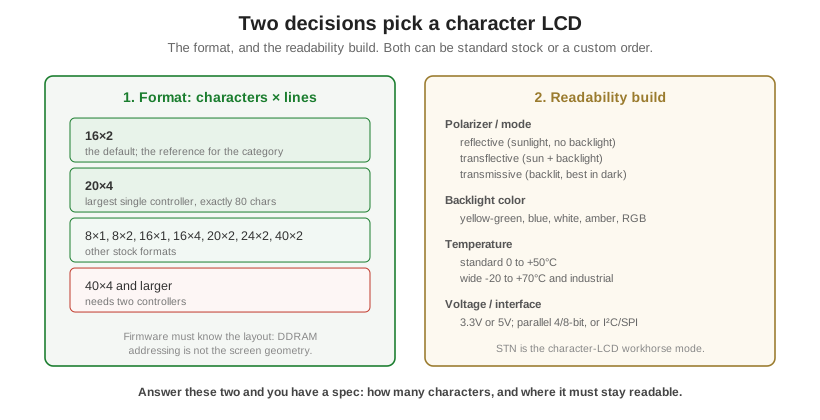
Orient Display builds character LCDs both ways: 16×2 and 20×4 off the shelf, and non-standard glass, backlight color, polarizer, voltage, temperature grade, interface, and pinout as a custom order. If you know the character count and where the display has to stay readable, that is enough to start. See the character LCD and graphic LCD lines for stock formats.