

Choosing a Display Interface
Once you know what the display interfaces are, the practical question is which one to use, and that answer is not a matter of preference. It falls out of two things: how much pixel data your display needs per second, and what your processor can actually source. Get those two right and the choice usually makes itself, because each interface has a throughput ceiling and each panel type makes a specific demand on the host. This is the decision guide to the interfaces surveyed in display interfaces explained: how to compute the bandwidth, why the host’s capabilities can decide the interface before bandwidth does, and the order to reason through it.
Part of the Design and Integration knowledge hub.
Start with the bandwidth
The single most decisive variable is the data rate, and it is a simple product: horizontal pixels times vertical pixels times bits per pixel times refresh rate. Color depth is usually 16 bits (RGB565), 18 (RGB666), or 24 (RGB888). Real links also have to clock the blanking intervals between lines and frames, which adds roughly 15 to 25 percent on top, and serial links add further encoding overhead and split the load across lanes. But the active-pixel figure is enough to see which interface class a display forces.
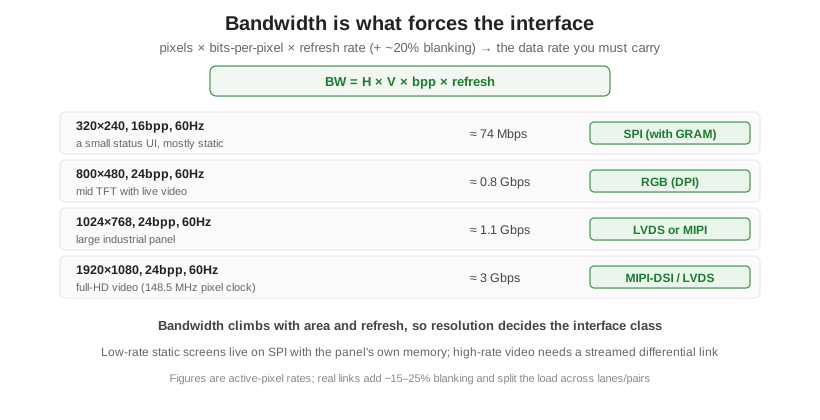
Walk the examples. A 320 by 240 status screen at 16-bit color and 60 Hz is about 74 Mbps, trivial, and since it is mostly static it can live on SPI while the panel refreshes itself from its own memory. An 800 by 480 panel at 24-bit color is roughly 0.8 Gbps with blanking, past the comfortable range of a memory-backed serial link, which pushes you to a parallel RGB interface streamed from a host frame buffer. A 1024 by 768 panel is about 1.1 Gbps, and a full-HD 1920 by 1080 panel is about 3 Gbps (its standard 148.5 MHz pixel clock puts it near 3.5 Gbps with blanking), both of which need a serialized differential link, LVDS or MIPI-DSI. Bandwidth climbs with area and refresh, so resolution effectively chooses the interface class for you.
The question that eliminates most options: does the panel have memory?
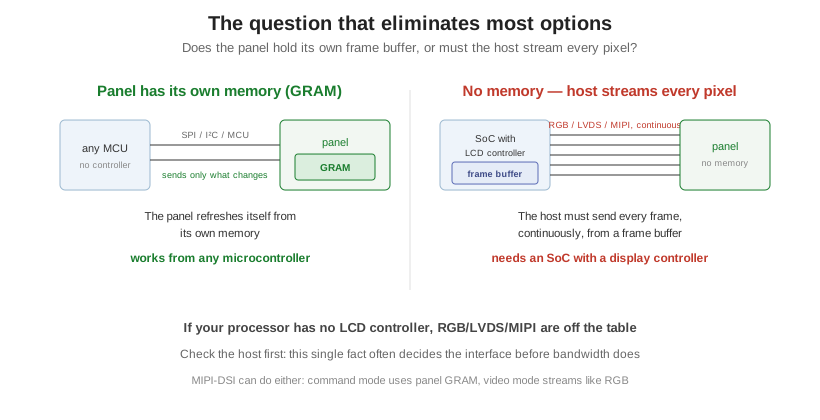
Before you fine-tune bandwidth, ask whether the panel carries its own frame buffer. I2C, SPI, and MCU-parallel panels have on-board display RAM (GRAM), so they store the image and refresh themselves, and the host only writes what changes; these work from almost any microcontroller. RGB, LVDS, and MIPI panels have no memory, so the host must stream every pixel of every frame continuously, which requires a processor with a dedicated LCD controller and a frame buffer in RAM. This is the fact that most often decides the interface: if your chosen processor has no display controller, then RGB, LVDS, and MIPI are simply off the table no matter what the bandwidth math says, and you are working within SPI or MCU parallel. Check the host first. This connects back to how the panel itself is scanned, in how LCDs are driven.
The decision sequence
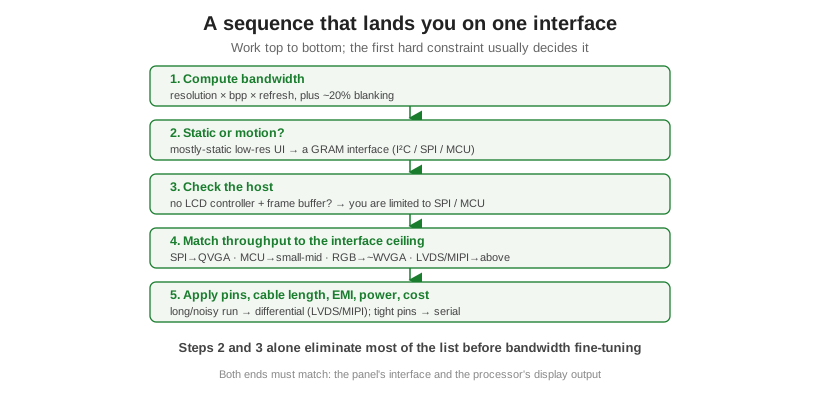
Put it in order. First, compute the bandwidth. Second, decide whether the display is mostly static or needs live motion; a static low-resolution UI points straight at a GRAM interface. Third, check the host for an LCD controller and frame buffer; without them you are limited to SPI or MCU parallel. Fourth, match the throughput to each interface’s ceiling: SPI to about QVGA, MCU parallel to small and mid panels, RGB to roughly WVGA, and LVDS or MIPI above that. Fifth, apply the remaining constraints, pin budget, cable length, EMI, power, and cost, where a long or noisy cable run favors a differential link and a tight pin budget favors a serial one. Steps two and three usually eliminate most of the list before the fine-tuning even begins, and both ends have to match: the panel’s interface and the processor’s display output.
Quick answers to common cases
| Display | Sensible interface | Why |
|---|---|---|
| Character LCD or 128×64 OLED | I²C or SPI | Tiny data, panel has its own memory |
| 320×240 color UI, mostly static | SPI (or MCU parallel) | GRAM panel, works from any MCU |
| 7-inch 1024×600 with video | RGB/DPI, or MIPI/LVDS on a capable SoC | Too much data for SPI; needs streaming |
| Full-HD 1080p panel | MIPI-DSI or LVDS | ~3 Gbps; only differential links carry it |
| Long cable / noisy industrial run | LVDS | Differential: low EMI, reaches meters |
A recurring question is whether SPI can do video: technically yes, but a 40 MHz SPI link only manages about 10 to 15 frames per second full-screen at 320 by 240, fine for a status UI and poor for real motion. As a custom module manufacturer, Orient Display’s job is to match the panel’s interface to the processor you have chosen, and many display controllers can be built with more than one interface option, so the same glass can ship as SPI or RGB to fit your host. To size the bandwidth, confirm host support, and pick the interface for a specific design, start a custom project, or browse the TFT, graphic, and character lines.