

Display Interfaces Explained
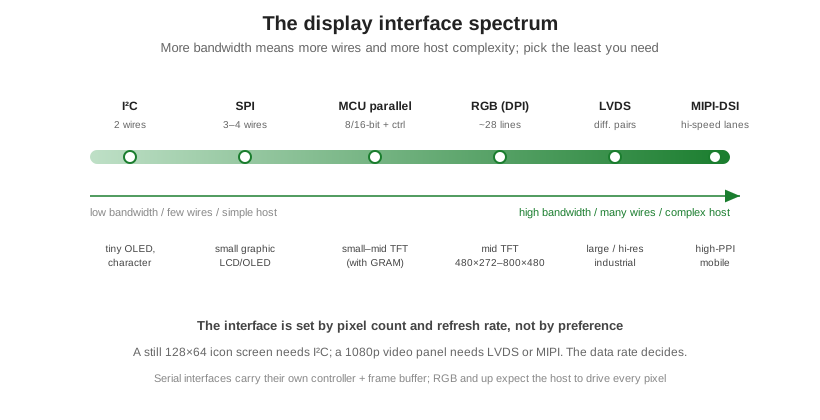
A display’s interface is how pixel data gets from your processor to the panel, and it is one of the first things to lock down in a design, because it constrains both the display you can use and the host that drives it. There are really only a handful of choices, and they line up on a single axis: how much data the screen needs per second. A still, two-color icon screen sips data over two wires; a full-motion 1080p panel needs a firehose of high-speed differential pairs. Pick the interface that carries just enough, because every step up costs wires, board area, and host complexity. For the panels these interfaces drive, see what a TFT display is.
Part of the Design and Integration knowledge hub.
The serial interfaces: I²C and SPI
The two serial interfaces send data one bit at a time over very few wires, and they suit small displays that carry their own controller and frame buffer. I²C uses just two wires, a clock and a data line, shared across multiple devices. It is slow, so it fits character LCDs and tiny monochrome OLEDs showing a few characters or a small icon, where the data per refresh is measured in bytes. SPI uses three or four wires and runs much faster, into the tens of megahertz, which is enough for small graphic LCDs and color OLEDs up to a couple hundred pixels on a side. Because the panel stores the image in its own memory, the host only sends what changes, so an SPI screen works from almost any microcontroller with no special hardware.
The parallel interfaces: MCU parallel and RGB
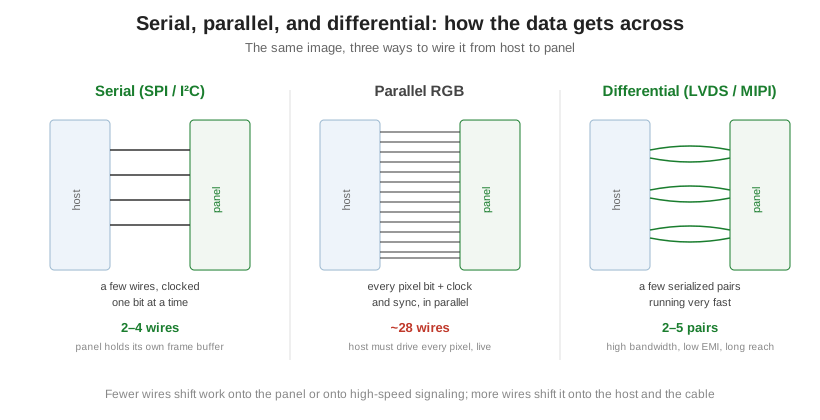
Parallel interfaces move a whole byte or pixel at once across many wires. MCU parallel (the classic 8080 and 6800 bus types) uses an 8- or 16-bit data bus plus a few control lines to talk to a panel that, like an SPI screen, has its own on-board display RAM. It is faster than SPI and suits small to mid-size color TFTs running a simple interface, roughly up to 320 by 240. RGB, also called DPI or parallel RGB, is a different animal: there is no frame buffer on the panel, so the host must stream every frame continuously, sending the red, green, and blue bits along with a pixel clock and horizontal, vertical, and data-enable sync signals. The data-line count follows the color depth, 16 for RGB565, 18 for RGB666, or 24 for RGB888, so with the timing lines it lands at roughly 22 to 28 wires, and it demands a host with a real display controller and its own frame buffer. RGB is the workhorse for mid-size TFTs from 480 by 272 up to about 1024 by 600 that need smooth, live video.
The high-speed differential interfaces: LVDS and MIPI-DSI
Past roughly 800 by 480, a wide parallel bus becomes impractical: too many fast-switching wires, too much electromagnetic noise, and too short a usable cable. The answer is to serialize the pixel data onto a few high-speed differential pairs. LVDS does this with low-voltage differential signaling, packing the RGB data into a handful of pairs that tolerate a longer cable and radiate little noise, which makes it the standard for larger industrial and automotive panels from 1024 by 600 up through full HD. MIPI-DSI is the mobile-world equivalent, running even faster over one to four data lanes to feed the high-pixel-density screens in phones and tablets; it is the highest bandwidth of the group but also the most demanding, with short reach and tight timing. Both require a host processor built to drive them.
Choosing among them
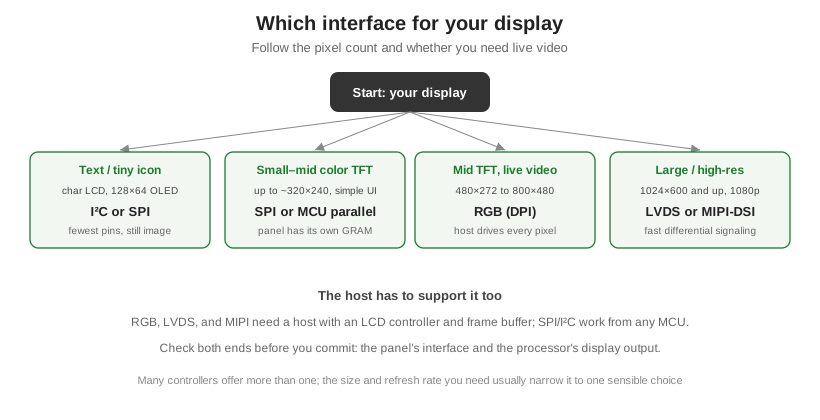
The choice is set by pixel count and whether you need live video, not by preference, and it has to match at both ends: the panel’s interface and the processor’s display output. A still icon screen takes I²C or SPI; a small color UI takes SPI or MCU parallel; a mid-size video panel takes RGB; a large or high-resolution panel takes LVDS or MIPI-DSI.
| Interface | Wires | Relative speed | Panel has frame buffer? | Typical use |
|---|---|---|---|---|
| I²C | 2 | Lowest | Yes | Character LCDs, tiny OLEDs |
| SPI | 3–4 | Low | Yes | Small graphic LCD/OLED |
| MCU parallel (8080/6800) | ~11–24 | Moderate | Yes | Small–mid color TFT, simple UI |
| RGB (DPI) | ~22–28 | High | No (host streams pixels) | Mid TFT, live video |
| LVDS | 4–5 pairs (1 ch.) | Very high | No | Large / high-res industrial |
| MIPI-DSI | 1–4 lanes | Highest | No | High-PPI mobile displays |
Matching the interface to the resolution, refresh rate, and host is exactly the tradeoff worked through in choosing a display interface, and it connects to how the panel itself is addressed in how LCDs are driven. Orient Display builds character, graphic, and TFT displays across every interface here and can match the panel to your processor’s display output. To scope the interface for a specific design, start a custom project.