

How LCDs Are Driven
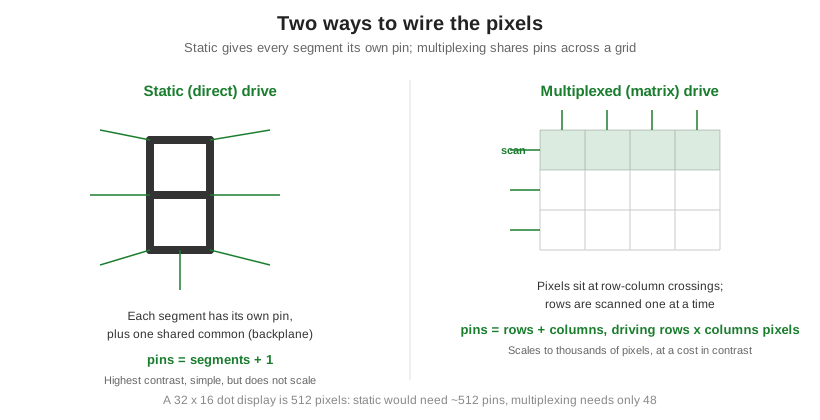
An LCD is driven one of two ways. Static, or direct, drive gives every segment its own pin and switches it directly against a shared common electrode. It is simple and gives the highest contrast, but the pin count rises with every segment, so it only suits small displays like a few digits. Multiplexed, or matrix, drive arranges the pixels in a grid of rows and columns and scans one row at a time, which lets a handful of pins control thousands of pixels. Multiplexing is the only practical way to drive a dense display, but it trades away contrast, and how far you can push it is set by a hard physical limit. That limit is also the reason STN exists. For the cell being driven, see what an LCD is and how it works.
Part of the Display Fundamentals knowledge hub.
Static vs multiplexed addressing
In static drive, each segment connects to its own pin and is held on or off continuously against one common backplane. Because the segment is driven the whole time, contrast is excellent, well over 100:1. The catch is scaling: a display with S segments needs roughly S pins plus a common, so static drive runs out of pins quickly. In multiplexed drive, pixels sit at the crossings of row and column electrodes. The driver energizes one row at a time and sets all the columns for that row, then moves to the next row and repeats fast enough that the eye sees a whole image. The payoff is dramatic pin savings: a 32 by 16 dot display holds 512 pixels, which static drive would wire with hundreds of pins but multiplexing handles with just 48, the rows plus the columns.
Duty cycle and bias: how the scan works
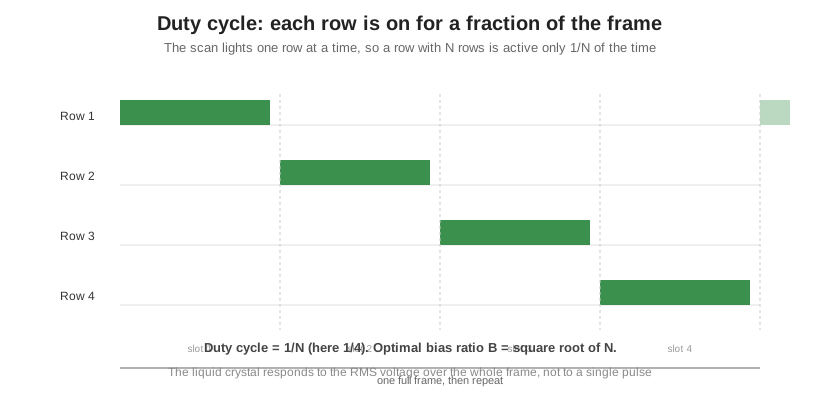
Because a multiplexed driver lights one row at a time, each row is only active for a fraction of each frame. With N rows, a given row is on 1 out of every N slots, which is its duty cycle, written 1/N. A display scanning 16 rows runs at 1/16 duty. The liquid crystal does not react to a single pulse; it responds to the RMS voltage averaged over the whole frame, which is what makes multiplexing work at all. The driver uses several voltage levels to widen the gap between a selected and non-selected pixel, and the ratio between the row and column voltages is the bias. The optimal bias ratio is the square root of the number of rows. Duty cycle is also why the same panel looks worse as it drives more lines, the effect seen in LCD viewing angle and contrast.
The multiplex limit: why contrast falls and why STN exists
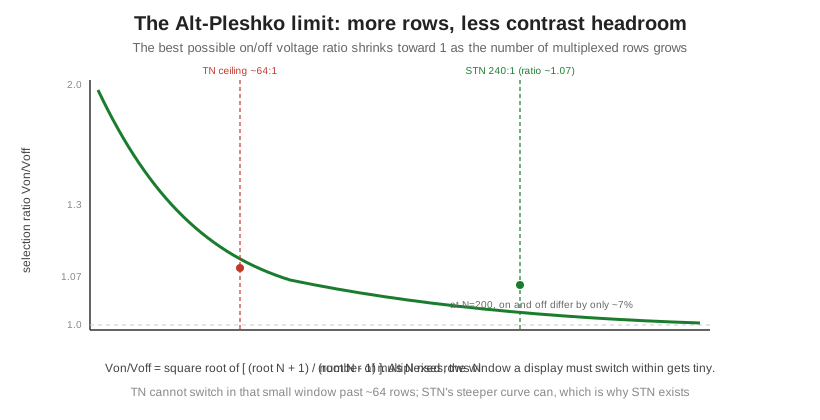
There is a hard ceiling on how well multiplexing can work, described by Alt and Pleshko in 1974. The best achievable ratio between the on and off RMS voltages is Von/Voff equal to the square root of (root N plus 1) divided by (root N minus 1), where N is the number of multiplexed rows. The important part is the behavior: as N grows, that ratio shrinks toward 1. At 200 rows the on and off voltages differ by only about 7 percent, and at 240 rows the needed ratio is about 1.07. To switch cleanly inside a window that narrow, the liquid crystal needs a very steep brightness-versus-voltage curve. A standard TN fluid is not steep enough past roughly 64 rows, which is why TN tops out near 64 to 1 multiplexing. Supertwisted nematic fluid, twisted around 270 degrees, has a far steeper curve and can switch within that tiny window, which pushed passive displays to 240 to 1 and beyond. That is the physical reason STN was invented, and it closes the loop from liquid crystal types.
Which scheme a display uses
The choice follows the pixel count. A few segments or a single character use static drive for its simplicity and contrast. Anything with many pixels, a multi-line character module or a graphic dot matrix, has to be multiplexed, and the higher the line count the more the fluid choice matters.
| Attribute | Static (direct) drive | Multiplexed (matrix) drive |
|---|---|---|
| Wiring | One pin per segment plus a common | Rows plus columns drive rows times columns pixels |
| Pin count | Rises with every segment | Stays low even for many pixels |
| Contrast | Highest (over 100:1) | Falls as rows increase (Alt-Pleshko limit) |
| Complexity and cost | Simple driver, low cost | Needs a multiplexing driver and careful voltages |
| Typical use | Segment and single-character displays | Multi-line character and graphic dot-matrix displays |
Orient Display builds both static and multiplexed character and graphic modules and specifies the fluid and drive scheme for the line count a design needs, from concept to production; see the LCD product line.