

Common Display Sizes and Resolutions
Display resolutions hide behind a wall of acronyms, and most of them trace back to one number: VGA, 640×480. A Q quarters it, a W widens it, and the rest stack prefixes from there. This is a lookup page, not a tutorial: the tables below give the standard names with their exact pixel dimensions, the aspect ratios, which resolution tends to ship on which panel size, and how to work out pixel density. It pairs with how to read a display datasheet, where the same size numbers appear as outline, viewing, and active area, and with display interfaces, since resolution is what pushes you from one interface to the next.
Part of the Reference knowledge hub.
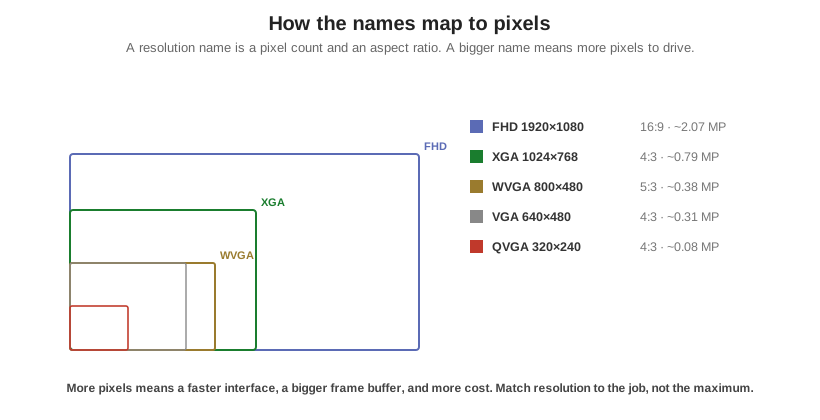
The naming system, in one breath
The base unit is VGA, 640×480, at a 4:3 ratio. From there the prefixes compose: Q (quarter) cuts each dimension in half, so QVGA is 320×240; Q stacked again gives QQVGA at 160×120. W (wide) stretches the width for a widescreen ratio, turning VGA into WVGA at 800×480. S (super), X (extended), U (ultra), and F (full) climb the ladder to SVGA, XGA, UXGA, and FHD. The system is descriptive rather than strict, which is why a few names carry more than one meaning in practice. When it matters, and on a purchase order it always matters, state the pixels, not just the acronym.
Standard resolutions at a glance
Sorted from fewest pixels to most. Where an acronym has more than one common value, the workhorse value is listed first and the variants are noted. Bold names are the ones you will actually meet on embedded and industrial panels.
| Acronym | Pixels (W×H) | Aspect | Typical use / note |
|---|---|---|---|
| QQVGA | 160×120 | 4:3 | Tiny status displays, wearables |
| QVGA | 320×240 | 4:3 | Small TFTs, 2.4 to 3.5 in |
| HVGA | 480×320 | 3:2 | 3.5 in; some vendors also call 480×272 HVGA |
| WQVGA | 480×272 (also 400×240) | ~16:9 / 5:3 | 4.3 in workhorse; acronym is ambiguous |
| VGA | 640×480 | 4:3 | The reference point; 5 to 6.5 in |
| WVGA | 800×480 | 5:3 | The 5 in and 7 in industrial workhorse |
| FWVGA | 854×480 (also 848×480) | ~16:9 | Full-width 16:9 version of WVGA |
| qHD | 960×540 | 16:9 | Exactly one quarter of Full HD |
| SVGA | 800×600 | 4:3 | Legacy 4:3, 8 to 12.1 in |
| WSVGA | 1024×600 | ~16:9 | Very common on 7 in and 10.1 in |
| XGA | 1024×768 | 4:3 | Classic 4:3 industrial, 10.4 to 15 in |
| WXGA | 1280×800 or 1366×768 | 16:10 / ~16:9 | Two distinct meanings; always state pixels |
| HD / 720p | 1280×720 | 16:9 | “HD” alone is ambiguous |
| SXGA | 1280×1024 | 5:4 | Legacy industrial monitors |
| FHD / 1080p | 1920×1080 | 16:9 | Standard for 10.1 in and up modern HMI |
| WUXGA | 1920×1200 | 16:10 | Premium 12.1 to 15.6 in |
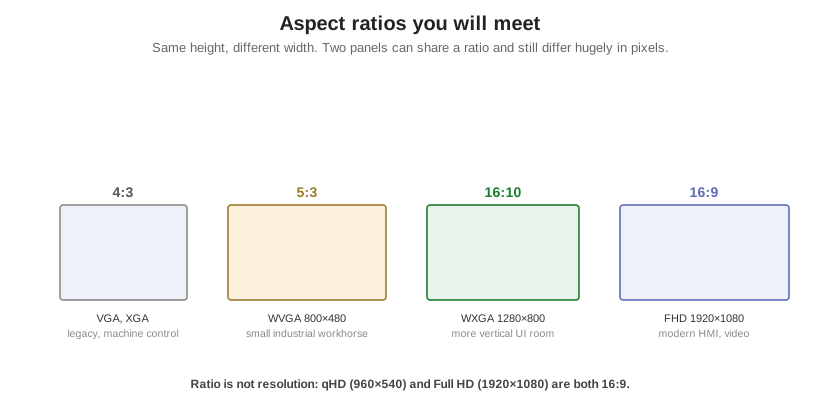
Aspect ratios
Aspect ratio is the shape; resolution is the count. They are independent: two panels can share 16:9 and differ by millions of pixels. Ratio usually tells you the era and the application more than the resolution does. The 4:3 and 5:4 shapes dominate legacy machine-control panels; 5:3 (also written 15:9) is the small-industrial WVGA shape; 16:10 gives a little more vertical room for toolbars and lists, which is why it persists in industrial and tablet-style HMI; 16:9 is the modern, video-oriented default. Beyond these, custom bar-type and portrait-strip glass exists for shelf edges, appliances, and instrument clusters, at whatever ratio the mechanical opening demands.
| Ratio | Decimal | Where it shows up |
|---|---|---|
| 4:3 | 1.33 | QVGA, VGA, SVGA, XGA: legacy, machine control |
| 5:4 | 1.25 | SXGA, 1280×1024 |
| 3:2 | 1.50 | HVGA and handheld formats |
| 5:3 | 1.67 | WVGA 800×480: very common small industrial |
| 16:10 | 1.60 | WXGA 1280×800, WUXGA: more vertical UI room |
| 16:9 | 1.78 | HD, qHD, FHD, FWVGA: modern, video-oriented |
Which resolution ships on which size
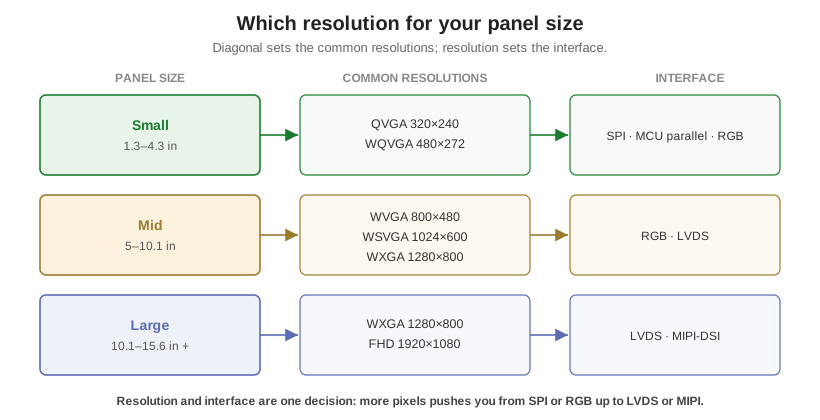
Diagonal size and resolution are loosely paired by what the market tools up in volume. Character LCDs are specified by a character grid rather than pixels, and live in their own standard character configurations. Small graphic TFTs from about 1.3 to 4.3 in cluster on QVGA and WQVGA. The 5 to 7 in range is WVGA and WSVGA territory, with 1280×800 as the crisp option at 7 in. Mid panels at 8 to 10.1 in run SVGA and XGA on the older 4:3 stock and 1024×600, 1280×800, or 1920×1200 on modern widescreen glass. Large industrial panels of 12.1 to 15.6 in and up top out at XGA on legacy 4:3 and FHD on modern 16:9, often as high-brightness IPS. The router below ties each tier to its usual resolutions and the interface that comes with them.
The acronyms that bite
A handful of names are genuinely ambiguous, and ordering glass by the acronym alone is how the wrong panel arrives. WQVGA covers 480×272, 400×240, and others; the two are different shapes, not just sizes. WXGA is the worst offender: 1280×800 is 16:10 while 1366×768 is roughly 16:9, so a drawing that says only “WXGA” is under-specified. HVGA, WVGA, and FWVGA each have secondary values too. And “HD” is marketing, not a resolution: it can mean 1280×720, 1366×768, or loosely 1080p. The fix is the same every time: put the pixel dimensions on the spec and the acronym in parentheses. One more practical note, portrait and landscape are the same glass driven in a different orientation, so 480×800 and 800×480 are one panel, not two.
Pixel density: PPI and dot pitch
Resolution alone does not tell you how sharp a panel looks; density does. Pixels per inch is the diagonal pixel count divided by the diagonal in inches: PPI = √(width² + height²) / diagonal. A 7 in panel at 800×480 works out to about 133 PPI; the same 7 in at 1024×600 is about 170 PPI, which is why the higher-resolution option looks visibly crisper for text-heavy interfaces. Dot pitch is the flip side, the center-to-center spacing in millimeters, equal to 25.4 / PPI; smaller is finer. More pixels is not automatically better on a small display, though: it demands a faster interface, a larger frame buffer, and a more capable host, and past the eye’s resolving limit at the working distance it buys nothing. A clean 800×480 is often the right engineering answer over 1280×800.
These tables are the standard menu, not the limit. As a custom manufacturer, Orient Display builds non-standard resolutions and aspect ratios, bar-type and square and portrait glass, when the application needs them, but picking a mainstream size and resolution uses stock glass tooling and driver ICs, which keeps cost and lead time down. Decide resolution and interface together, then check the numbers against a real datasheet and the interface quick reference. Orient Display’s TFT and LCD lines span these sizes off the shelf and custom.