

Display Glossary
Most costly display-spec mistakes start as a vocabulary mistake: the buyer and the manufacturer using the same word for two different things. This glossary is the shared vocabulary. It defines the display terms and acronyms that show up on datasheets and in quotes, grouped by where they belong in the stack rather than strictly alphabetized, so related terms sit together. For the fuller story behind any entry, the deeper articles link out, starting with what an LCD is and the display technologies hub. Terms that must be fixed at manufacture, and so must appear on the order, are flagged where they occur.
Part of the Reference knowledge hub.
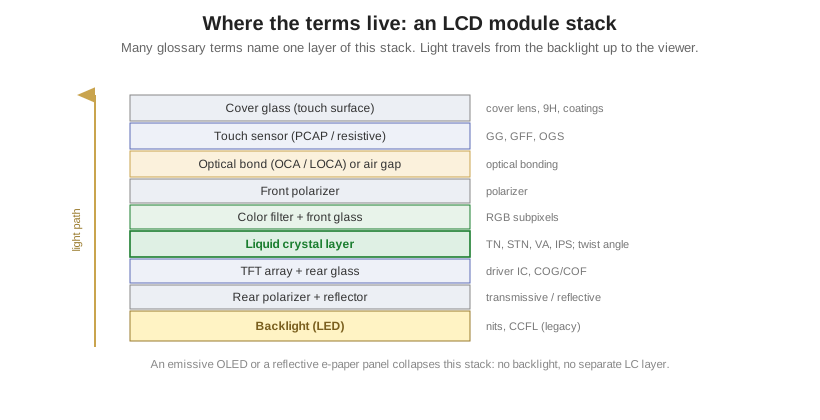
Panel technologies
- LCD (Liquid Crystal Display): A non-emissive display that modulates light by electrically twisting liquid-crystal molecules between two polarizers. It makes no light of its own, so it needs a backlight or ambient light to be seen.
- Liquid crystal (LC): A state of matter that flows like a liquid but keeps crystal-like molecular order. Its molecules reorient under an electric field, which is how an LCD switches a pixel light or dark.
- Nematic: The simplest liquid-crystal phase, rod-shaped molecules pointing roughly one direction but randomly positioned. It is the working fluid of most LCDs.
- Twist angle: The angle the LC molecules rotate from front glass to rear glass in a twisted-nematic cell. The value (90 degrees, 180 to 270 degrees) defines the family, TN versus STN.
- TFT (Thin-Film Transistor): An active-matrix LCD where every sub-pixel has its own transistor on the glass, giving fast response and full color. Common mistake: TFT is a driving method, not a rival to IPS or VA, which are themselves TFT variants.
- TN (Twisted Nematic): LC twisted 90 degrees. The cheapest and fastest LCD mode, with narrow viewing angles and off-axis color shift. Used in monochrome segment and character LCDs and low-cost color panels.
- HTN (High-Twisted Nematic): A twist near 110 degrees, a low-cost step up from TN with better contrast and viewing angle. Common in segment displays.
- STN (Super-Twisted Nematic): LC twisted 180 to 270 degrees. The steeper twist sharpens the voltage response and allows higher multiplex rates than TN, usually with a yellow-green or blue tint unless compensated.
- FSTN (Film-compensated STN): An STN with a retardation film that cancels the color cast, giving true black on white. Common in sharp monochrome character and graphic modules.
- VA (Vertical Alignment): An LCD mode with LC perpendicular to the glass when off, giving deep blacks and high contrast. Wider angle than TN, slower than IPS.
- MVA (Multi-domain Vertical Alignment): A VA variant that splits each pixel into domains aligned differently, widening the viewing angle and reducing off-axis color shift.
- IPS (In-Plane Switching): An LCD mode where LC rotates in the plane of the glass, delivering the widest, most color-stable angles, at higher cost and historically slower response than TN.
- OLED (Organic Light-Emitting Diode): An emissive display whose pixels make their own light. No backlight, true blacks, wide angle, and a thin form.
- AMOLED (Active-Matrix OLED): An OLED driven by a TFT backplane, enabling large, high-resolution, video-rate panels.
- PMOLED (Passive-Matrix OLED): An OLED driven by a simple row and column matrix with no per-pixel transistor. Cheaper and simpler, but limited in size, resolution, and brightness. Common in small monochrome status displays.
- e-paper / EPD (Electrophoretic Display): A reflective, bistable display that mimics ink on paper, reflecting ambient light and holding its image at zero power. Common mistake: “e-paper” is the technology category; E Ink is a brand within it, not a synonym.
- E Ink: A registered trademark of E Ink Corporation, the dominant maker of electrophoretic panels. Use “E Ink” only for that company’s panels and “e-paper” or “EPD” for the technology.
- Electrophoretic: The effect behind most e-paper: charged pigment particles in a fluid move under a field to show white or black.
- Bistable: Holds either state, image or blank, with no power applied. The defining power-saving property of e-paper.
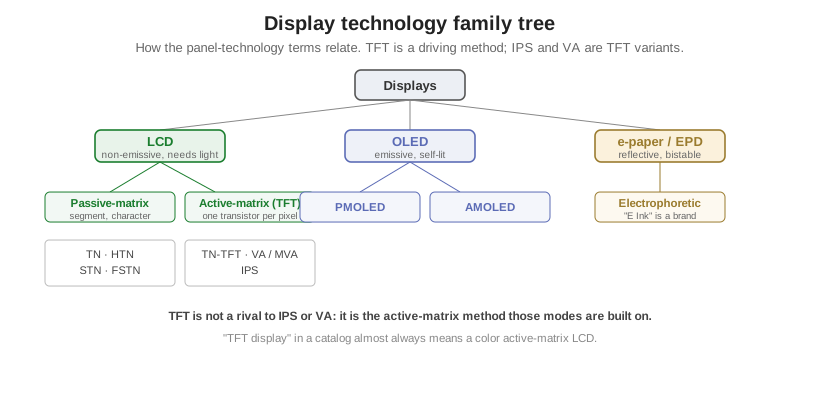
LC modes side by side
| Mode | Twist / alignment | Viewing angle | Contrast | Response | Typical use |
|---|---|---|---|---|---|
| TN | 90° twist | Narrow | Low to medium | Fast | Cheap segment and character, low-cost color |
| HTN | ~110° twist | Better than TN | Medium | Fast | Low-cost segment upgrade |
| STN | 180 to 270° twist | Medium | Medium, tinted | Slower | High-multiplex monochrome graphic |
| FSTN | STN + film | Medium | Medium, true B/W | Slower | Sharp monochrome character and graphic |
| VA / MVA | Vertical align | Wide | Very high | Slower | Deep blacks, high contrast |
| IPS | In-plane rotate | Widest | High | Medium | Color-critical, wide-angle |
Light source and optics
- Backlight: The light source behind a transmissive or transflective LCD. The LC layer only shutters this light; it does not create it.
- LED backlight: The modern standard, valued for long life, low power, and wide color. Brightness in nits and color point are largely a backlight spec.
- CCFL (Cold-Cathode Fluorescent Lamp): The older tube backlight that LEDs replaced. Higher voltage, shorter life, now mostly legacy.
- EL (Electroluminescent) backlight: A thin, uniform panel that glows under AC drive. Low brightness, historically a soft backlight for character LCDs. Distinct from OLED, which is electroluminescent per pixel.
- Polarizer: A film that passes light of one polarization only. An LCD has a front and a rear polarizer, and the LC layer rotates light between them to make a pixel light or dark.
Transmission modes and appearance
- Transmissive: Viewed with the backlight on. Best in low ambient light, washes out in bright sun. No rear reflector.
- Reflective: Uses a rear reflector and no backlight. Highly sunlight-readable and very low power, but unreadable in the dark. Think calculators and meters.
- Transflective: A partial reflector plus backlight, readable in sun and in the dark, at lower peak brightness and contrast than a pure transmissive.
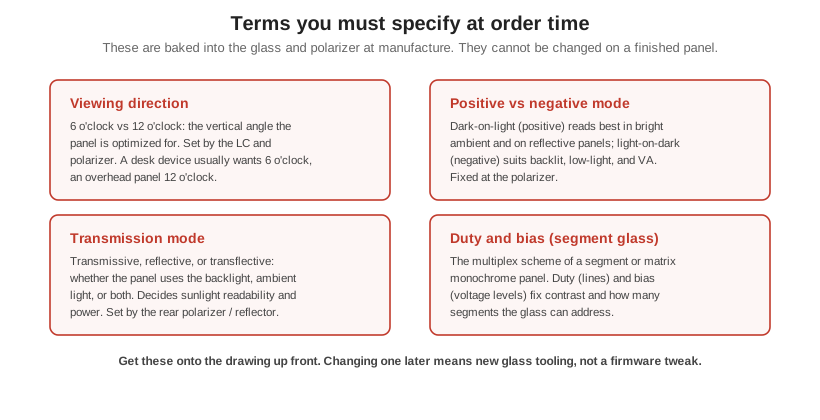
- Positive mode: Dark characters on a light background. Usually more readable in bright ambient light and on reflective displays. Fixed at the polarizer, so specify it at order time.
- Negative mode: Light characters on a dark background. Looks best backlit or in low light, and is the natural look for transmissive VA panels.
- Viewing angle: The maximum off-axis angle at which contrast and color stay within spec. A headline difference between TN (narrow) and IPS or VA (wide).
- Viewing direction (6 o’clock / 12 o’clock): The preferred vertical viewing position of a monochrome panel, named like a clock. A 6 o’clock display looks best from below the normal, 12 o’clock from above. Baked in at manufacture, so it must be specified when ordering.
Image-quality metrics
- Contrast ratio: The ratio of brightest white to darkest black, usually measured in a dark room, so it overstates real-world performance.
- ACR (Ambient Contrast Ratio): Contrast measured with ambient light on the screen, the realistic metric for sunlight readability. High static contrast wins in dim light; high brightness wins as ambient light rises.
- Luminance: How much light a surface emits per unit area, in candela per square metre. This is what people loosely call brightness.
- nit: The common name for the unit of luminance. Common mistake: a nit is one cd/m², the same unit, not two different things. “500 nits” and “500 cd/m²” are identical.
- cd/m² (candela per square metre): The SI unit of luminance, equal to one nit.
- Response time: How fast a pixel switches states, in milliseconds, often quoted gray-to-gray. Lower means less motion blur. TN is fastest among LCDs, VA slowest; OLED is near instant.
- Gray level / grayscale: The number of brightness steps a sub-pixel can show between off and full on. More steps means smoother gradients.
- Color depth / bpp (bits per pixel): How many bits encode a pixel’s color, for example 18-bit (262K colors) or 24-bit (16.7M colors). Higher bpp reduces banding.
- NTSC gamut: A color-gamut reference used in specs; “X% NTSC” covers that fraction of the NTSC area. Common mistake: 72% NTSC is not the same as 100% sRGB. The areas are similar, but they cover different colors, so the shorthand misleads.
- sRGB: The standard color space of most web and consumer content, and the practical target most panels are measured against.
Same thing, two names
| You may see | The truth |
|---|---|
| nit vs cd/m² | Identical unit. 1 nit = 1 cd/m². |
| e-paper vs E Ink | Category vs brand. E Ink is one maker of e-paper. |
| TFT vs IPS / VA | Method vs mode. IPS and VA are kinds of TFT LCD. |
| 72% NTSC vs 100% sRGB | Similar area, different colors. Not equivalent. |
| 9H pencil vs Mohs 9 | Different scales. 9H pencil is roughly 3 on Mohs. |
Drive electronics and construction
- Duty (multiplex ratio): In a multiplexed LCD, the fraction of time each common line is driven, for example 1/8 duty. Lower duty (more lines) cuts contrast, which limits how many lines TN and STN can address.
- Bias: The number of voltage levels used to drive a multiplexed LCD, for example 1/4 bias uses five levels. Duty and bias together define a segment or matrix drive scheme, and are fixed on the glass.
- Static drive: One pin per segment, each driven all the time. Sharpest contrast, but only practical for a few segments.
- Segment display: A display made of individually shaped, individually wired segments such as 7-segment digits or custom icons, rather than a pixel grid.
- GRAM / frame buffer: On-chip memory in a display controller that holds the image. The host writes pixels into GRAM and the controller refreshes the panel from it.
- Driver IC: The chip that supplies row and column drive voltages to the glass. A pure driver has no image memory of its own.
- Controller IC: The chip that holds the frame buffer and interprets commands, telling the driver what to output. Driver and controller are often combined in one IC on a module.
- HD44780: The classic Hitachi controller for character LCD modules such as 16×2. Its command set became the de-facto standard that countless character-LCD drivers still clone.
- COG (Chip on Glass): The driver IC is bonded directly onto the display glass, with no separate PCB. The thinnest, lowest-cost mounting for small modules.
- COB (Chip on Board): The IC sits on a PCB behind the glass, often as a wire-bonded epoxy blob. Bulkier than COG but supports more complex boards.
- COF (Chip on Film): The IC is mounted on a flexible film that also carries the interconnect. Common where the driver must fold behind a narrow border.
- TAB (Tape Automated Bonding): The IC is packaged on a carrier tape and bonded to the glass with anisotropic conductive film. A relative of COF used on larger panels.
- FPC (Flexible Printed Circuit): A thin flexible ribbon that carries signals from the glass to the host board. The standard interconnect on modern modules.
- FFC (Flat Flexible Cable): A flat multi-conductor ribbon cable, distinct from an FPC (a printed circuit), used to reach a mating connector.
- ZIF (Zero Insertion Force) connector: A connector that clamps an FPC or FFC after insertion, so no force stresses the fragile tail. Specify contact count, pitch, and whether contacts face up or down.
Touch, cover, and bonding
- Capacitive touch: Senses the capacitance change a finger causes on a grid of transparent electrodes. Supports multi-touch and a light, glass-front design.
- PCAP (Projected Capacitive): The dominant capacitive architecture, as in smartphones. A matrix of electrodes projects a field through the cover glass for multi-touch and a durable sealed front.
- Resistive touch: Two conductive layers separated by an air gap that touch under pressure. Works with any stylus or glove and is cheap, but single-touch, softer, and less clear than capacitive.
- Cover lens / cover glass: The outermost protective layer the user touches, often chemically strengthened glass. Carries any printed decoration; its hardness and coatings are spec items.
- 9H pencil hardness: A scratch spec from the pencil-hardness test (ASTM D3363), where 9H is the hardest test pencil. Common mistake: 9H pencil is not 9 on the Mohs mineral scale; the surface is roughly 3 Mohs and everyday sand can still scratch it.
- GG / GFF / OGS: Projected-capacitive constructions. GG (Glass-Glass) laminates cover glass to a separate glass sensor, robust and thicker; GFF (Glass-Film-Film) uses two plastic sensor films, thinner and cheaper; OGS (One Glass Solution) patterns the sensor on the cover glass underside, thinner and clearer but harder to yield.
- Optical bonding: Filling the air gap between display and cover or touch with clear adhesive, removing the internal air interface. Sharply improves sunlight readability, contrast, and ruggedness, and blocks condensation.
- OCA (Optically Clear Adhesive): A pre-cut solid adhesive film used to laminate the stack, typically pressed in an autoclave. Clean and repeatable, best for flat surfaces.
- LOCA (Liquid Optically Clear Adhesive): A liquid adhesive dispensed then UV-cured. Fills gaps and tolerates steps better than film, at the cost of a messier process.
- Air bonding: Bonding only at the edges, leaving an air gap between layers. Cheapest, but the extra air-to-glass interface reflects light and hurts sunlight readability and contrast.
Commercial terms
- MOQ (Minimum Order Quantity): The smallest quantity a manufacturer will produce for an order. A first feasibility number for any custom display, covered in MOQ, tooling, and lead times.
- NRE / tooling (Non-Recurring Engineering): The one-time upfront cost for custom design, masks, and tooling, such as a custom LC glass mask or a bezel mold, before unit pricing applies. The line item that separates custom from off-the-shelf.
A glossary is a shared-vocabulary tool, and for a custom build that shared vocabulary is what turns a requirement into a correct datasheet. The terms flagged here as fixed at manufacture, viewing direction, positive or negative mode, transmission mode, and duty and bias, are exactly the ones our engineers will ask you to pin down first. For the deeper stories, see display units and measurements for the numbers and the display technologies and design and integration hubs for the concepts.