

E-Paper Color Types
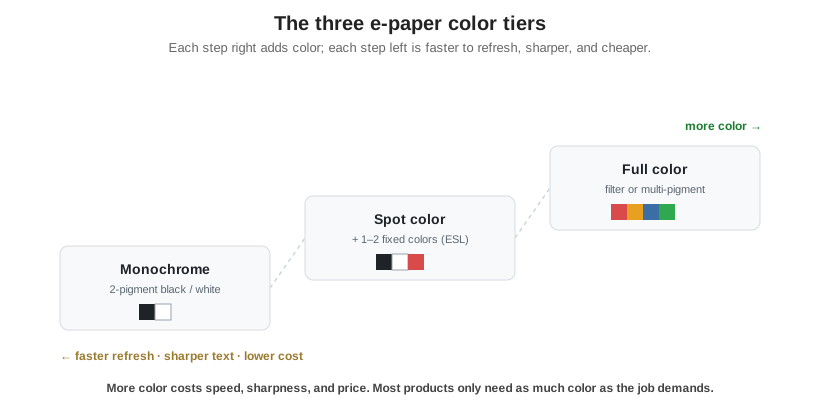
E-Paper comes in three color tiers, monochrome, spot color, and full color, and full color is produced two different ways: a color filter laid over a monochrome panel, or several colored pigments moving inside each capsule. Every version keeps E-Paper’s reflective, bistable nature; the tiers just trade color against speed, sharpness, and cost.
Part of the Display Technologies knowledge hub.
All color E-Paper is still electrophoretic e-paper: reflective, sunlight-readable, and holding its image with no power. Adding color never comes free. It costs either refresh speed or effective resolution, and the two full-color methods pay that cost in different places. Two questions decide what you need: how many colors, and, if full color, which method.
The three color tiers
Monochrome is the classic two-pigment black-and-white ink. It has the sharpest text, the fastest refresh, and the lowest cost, and it is still the right answer for most e-paper products. Spot color adds one or two fixed accent colors by including a third or fourth pigment, most commonly black-white-red or black-white-yellow. It keeps almost all of monochrome’s simplicity and is the workhorse of electronic shelf labels, where a red price change is all the color a tag needs. Full color opens a broad palette, and that is where the two methods below diverge.
Two ways to make full-color e-paper
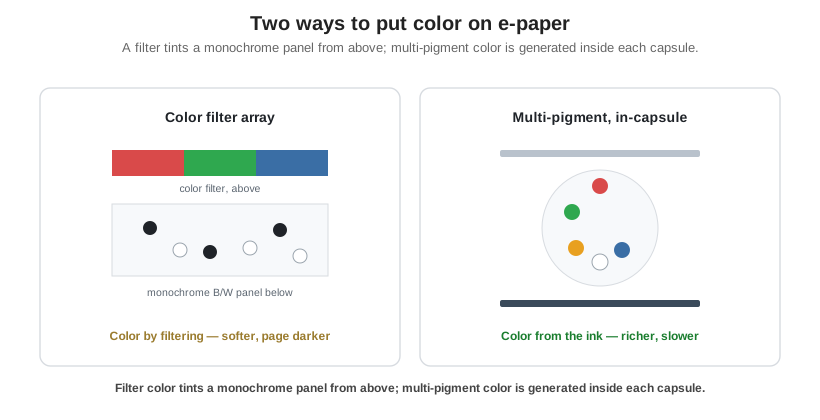
Full color is built by one of two methods, and the difference is where the color comes from. A color filter array lays a thin grid of red, green, and blue filters over a standard monochrome panel; the ink below still just decides light or dark, and the filter tints each pixel. A multi-pigment ink instead puts several colored pigment particles inside every capsule or microcup, and voltage waveforms bring the chosen colors to the surface, so the color is generated in the ink itself with no filter.
| Attribute | Color filter array | Multi-pigment |
|---|---|---|
| How color is made | RGB filter over a monochrome panel | Several colored pigments moved inside each capsule/microcup |
| Saturation | Softer, pastel; page looks darker | Higher; more vivid and reflective |
| Text sharpness | High monochrome resolution retained | Lower resolution for fine text |
| Refresh speed | Close to monochrome | Slower; full-color updates take seconds |
| Best fit | Color e-readers and e-notes, closer viewing | Retail signage and vivid static color, viewed at distance |
| Current examples | E Ink Kaleido | E Ink Spectra (signage), Gallery/ACeP (reading) |
Product generations move fast here. Treat the names above as current examples of the two methods, not fixed specs; the latest generation and its numbers live in a separate, dated post. Note too that “E Ink” is a supplier brand, not the category itself: see how E-Paper works.
Choosing a color e-paper
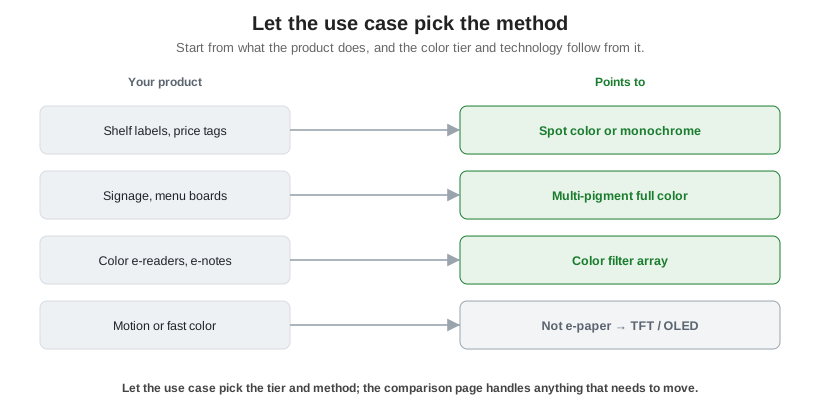
Match the tier and method to the job. For retail price tags and shelf labels, spot color, or plain black and white, is usually all that is needed and keeps refresh fast and cost low. For signage, menu boards, and poster-style layouts that want vivid color and are viewed at a distance and change infrequently, multi-pigment full color earns its slower refresh. For color e-readers and e-notes, where fine text and quick page turns matter and color is a supporting element, a color filter array reads closest to ordinary e-paper; reach for multi-pigment there only when rich color matters more than speed. And if the product needs motion or fast, saturated color, e-paper of any kind is the wrong tool. The technology comparison points you to TFT or OLED for that.
Orient Display supplies E-Paper modules, backed by US-based engineering from datasheet to production. Start a custom project and we will help you weigh color against refresh speed and cost for how your product will actually be used.