

LCD Power-on Process
On this page
LCD Power-On Process
As LCD engineers, we often receive the following question: Why does a display occasionally show a white screen during power-on, while under other conditions it initializes and operates normally?
At first glance, it may appear that there is a problem with the display. However, in most cases, the issue is related to power sequencing and initialization timing. In other words, it is more of a software or system-level timing issue rather than a hardware defect.
To better understand this phenomenon, we need to review the LCD power-on process from a system-level perspective.
What Happens During Power-On?
A display contains a driver IC, internal logic circuits, voltage generation circuits, and timing detection circuits.
When the display is powered on, the following sequence must be strictly followed:
- The digital logic power supply (VDD) rises.
- The analog driving voltages (AVDD, VGH, VGL) are established.
- The RESET signal is applied and then released.
- The host MCU begins transmitting video signals, including clock, sync, and pixel data.
If any of these steps fail or occur out of sequence, the panel may not initialize correctly.
When a white screen is observed, it does not necessarily mean that the display is defective.
In most cases, it indicates that the TFT driver IC is not operating in its normal image refresh state.
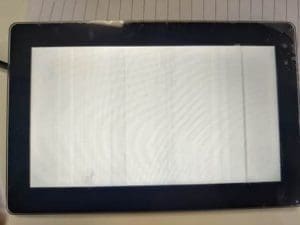
Possible Root Causes of a White Screen
-
The Source Driver Outputs a Default Voltage Level
Under normal operation, the driver IC converts digital pixel data into analog driving voltages. These voltages control the liquid crystal orientation, resulting in different light transmittance levels for each pixel.
If the driver IC has not completed initialization, has not detected valid timing signals, or has not received valid image data, it may enter a default output mode. In this mode, the output voltage typically corresponds to a fully open liquid crystal (LC) state, which results in a uniformly white screen.
-
No Valid Image Data Is Latched
The driver IC requires continuous timing signals to correctly latch pixel data. These signals include:
- Pixel clock
- HSYNC
- VSYNC
- Data Enable (DE)
If no valid image data is latched, the display may show a uniform white screen.
-
The TFT Driver IC Did Not Complete Initialization
During power-on, the driver IC requires time to:
- Stabilize internal analog voltages
- Establish gamma reference levels
- Start internal oscillators
- Exit standby or sleep mode
- Initialize internal logic blocks
If the RESET signal is released too early, or if video data transmission begins before initialization is complete, the driver IC may enter an undefined state. In such cases, it may output the default voltage level, resulting in a white screen.
This is the most common cause observed in practical applications.
-
Pixel Clock Synchronization Failure
If pixel clock synchronization fails, the driver IC cannot correctly latch pixel data. In this case, the display may exhibit:
- A white screen
- A fully bright or fully dark screen
- Corrupted images
- Flickering
- Vertical or horizontal stripes
- Misaligned lines
Conclusion
A white screen is usually not a display hardware failure.
If the panel is powered and the backlight is functioning, the hardware is operational. However, the initialization sequence may have been incomplete, incorrectly ordered, or mistimed.
Therefore, debugging should focus on verifying: Power sequencing, RESET timing, Initialization delay requirements, Valid timing, and video signal transmission.
If you have any questions, please contact our engineering.
Need a display built to your own spec? Start a custom project and our engineers respond within one business day.
Start a Custom ProjectHave a display project in mind?
Talk to an engineer about the display your application needs.