

Blog
FPC Capacitive Key: A Simple Way to Think About Touch

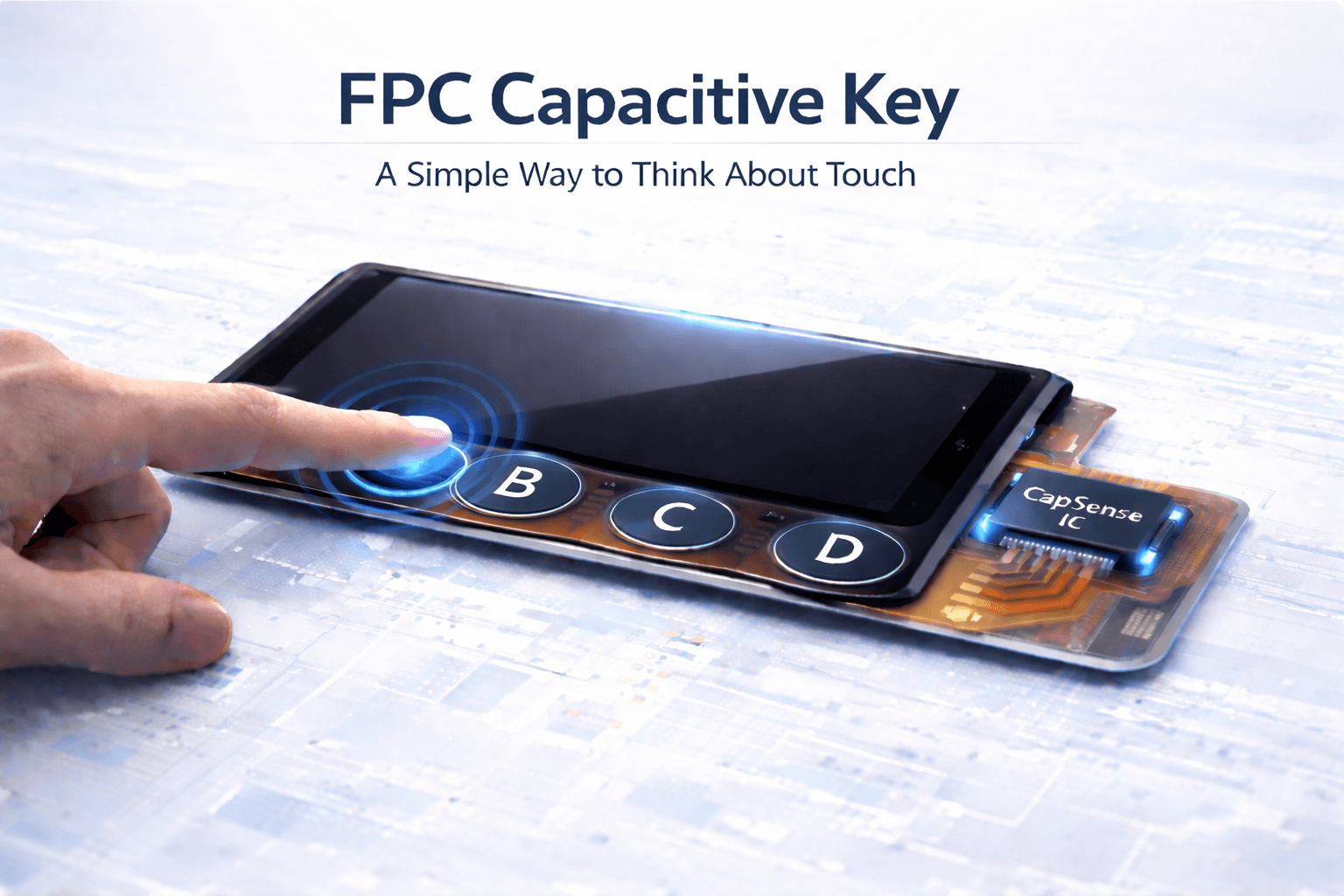
Sometimes when I look at the touch solutions we use every day, I get the feeling that a lot of designs exist simply because “that’s how it’s usually done,” not because they’re the only option.
Take touch screens, for example.
In most cases, when we say “touch,” we immediately think of a full capacitive touch panel—an entire surface that responds to input anywhere. It works, it’s intuitive, and for many applications, it’s absolutely the right choice.
But when the interaction is limited to just a few buttons, that kind of solution can feel a bit… heavy.
Not All Touch Needs Coordinates
The most common structure we deal with looks something like this:
Cover Lens + OCA + ITO Glass + FPC + Touch Controller
Its job is straightforward: detect where you touch (X-Y coordinates)
This makes perfect sense for interfaces that involve gestures, swiping, or dynamic UI, but not every interaction needs location tracking. Sometimes, all you really need is a simple “trigger.”
A Different Approach: CapSense
This is where capacitive sensing (CapSense) comes in. Instead of tracking position, it detects whether a specific area is being touched.
Typical structure:
Cover Lens + ITO Key (single layer) + FPC + CapSense IC
It’s commonly used for:
- Buttons
- Sliders
- Fixed touch zones
Compared to full touch panels, it simplifies things—but it still relies on ITO.
Taking It One Step Further: Removing ITO
And then there’s an even simpler approach.
FPC Capacitive Key is based on a very straightforward idea:
Replace ITO electrodes with copper electrodes on FPC
Which brings the structure down to:
Cover Lens + FPC + CapSense IC
No ITO layer, no full touch stack. Just what’s necessary.
What It Actually Looks Like
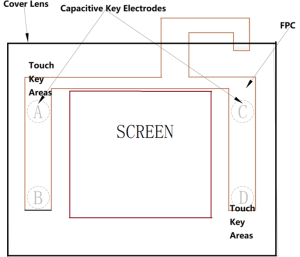
Below is a simplified layout that helps visualize how this approach is implemented.
The display sits in the center; Capacitive keys are distributed around the edges; All key electrodes are routed through the FPC; Each key (A/B/C/D) corresponds to an independent sensing area.
What’s interesting here is that the display and touch inputs are no longer part of the same stack. They coexist—but remain structurally independent.
How It Works
There’s no mechanical action involved, and nothing visibly moves.
- Metal electrodes (copper or silver) are formed on the FPC
- A sensing IC continuously monitors capacitance
- A finger approaches → capacitance changes
- The IC detects it and outputs a signal
It feels less like “pressing a button” and more like being detected.
Structurally, It’s Very Simple
From a hardware perspective, the simplicity stands out:
- Substrate: PET or PI (typically 0.1–0.3 mm)
- Electrodes: flexible in shape (round, bar, custom)
- Connection: direct FPC to mainboard
- Surface: glass or plastic overlay
And one key difference: No need for full ITO film or ITO glass. That alone can open up room in both design and cost.
Manufacturing Is Fairly Straightforward
Typical approaches include:
- Etching copper electrodes directly on FPC
- Printing conductive paste (silver or copper)
- Laminating a protective cover (glass or plastic)
- Connecting via standard FPC connectors
It feels closer to circuit design than display module integration.
What Stands Out in Practice
After working with this approach, a few characteristics become quite noticeable:
- No mechanical wear, No pressing action means longer lifespan
- Flexible form factor, FPC allows bending and tighter layouts
- Easier sealing, Better suited for waterproof or dustproof designs
- Simpler structure, Works well as a standalone input module
Where It Has Limits
Of course, it’s not meant to replace everything. Some practical constraints:
- Sensitive to environment (moisture, gloves, ESD) → requires tuning
- Larger button areas may reduce responsiveness
- Requires a dedicated capacitive sensing IC
- Not transparent
That last point is easy to overlook:
Since there’s no ITO, it doesn’t support transparent or semi-transparent designs
A Simple Way to Think About It
If you strip it down to function:
- Full interaction interface → use a touch panel
- Fixed input zones → capacitive keys
- Prefer a simpler structure → FPC Capacitive Key is worth considering
In the end, it’s not about choosing the most advanced solution. It’s about choosing something that fits—just enough, not more.
And sometimes, making things lighter is already an improvement.
If you have any questions, please contact our engineering.
