

Blog
Methods for Securing TFT and OLED Display Panels in an Enclosure

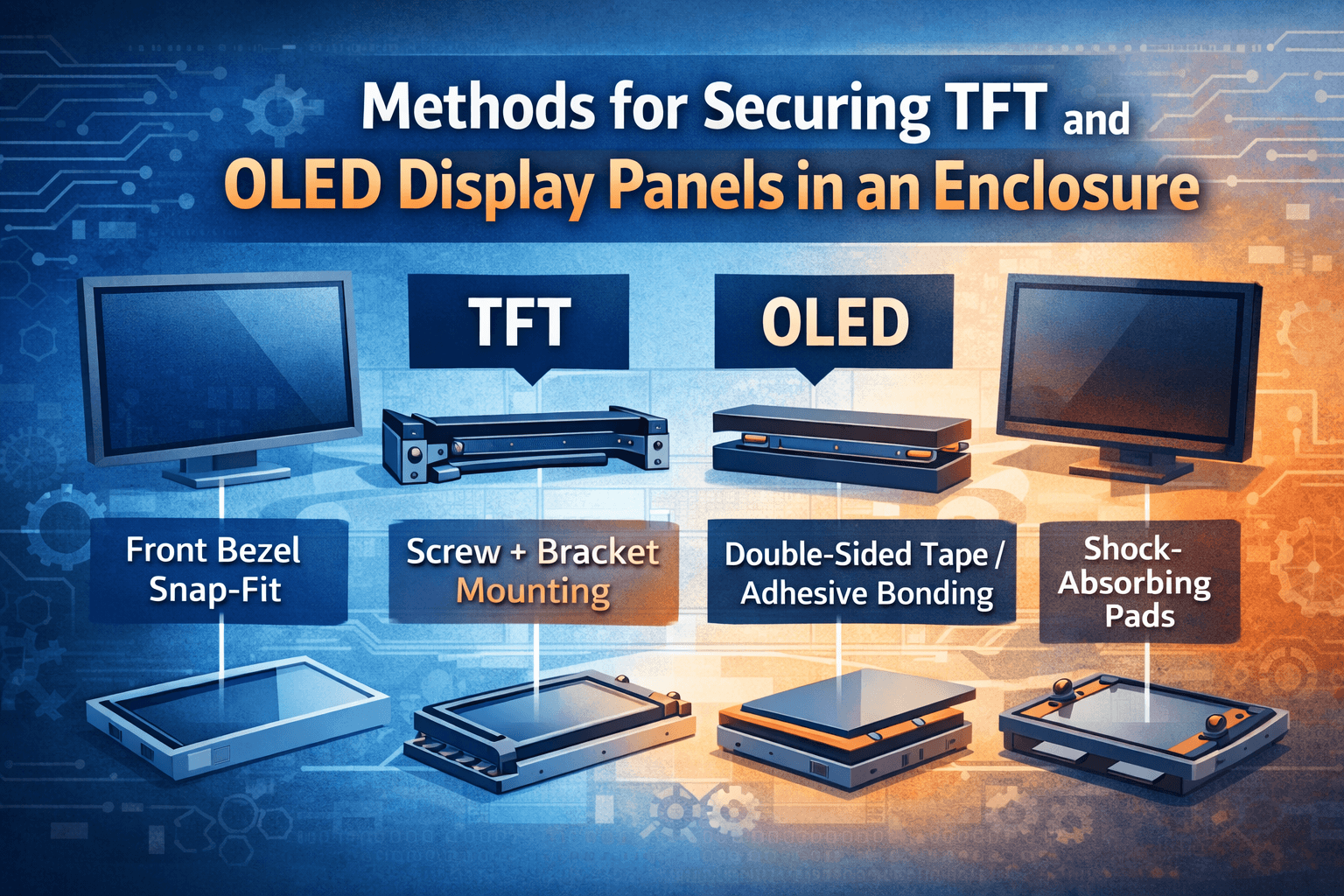
Most Common Mounting Methods (Consumer Displays / Laptops)
1. Front Bezel Snap-Fit
Principle
- The panel is inserted from the front
- A plastic front bezel uses snap-fit clips to hold the panel around its perimeter
- The rear cover is then assembled as a whole
Pros
- Low cost and fast assembly
- No screws required (or very few)
Cons
- Moderate impact resistance
- Snap clips are prone to damage after repeated disassembly
Commonly Used In
- Laptop computers
- Low-cost monitors
- All-in-one PC front housings
2. Screw + Bracket Mounting (Most Secure)
Principle
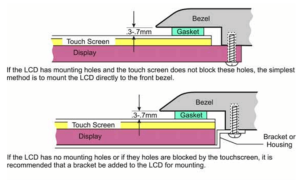
- The four corners and/or edges of the panel have VESA or M2/M3 mounting holes
- The panel is fastened to the rear housing using PCB, metal, or plastic brackets
- The front bezel is used only for decoration and dust protection
Pros
- High structural strength
- Controlled load on the panel (prevents glass damage)
- Easy to service and repair
Cons
- Slightly higher cost
- More assembly steps
Commonly Used In
- Desktop monitors
- Industrial displays
- Medical / commercial equipment
Thin and Bezel-Less Display Solutions
3. Double-Sided Tape / OCA Adhesive Bonding
Principle
- High-strength double-sided tape (such as 3M VHB) or high-strength adhesives are applied along the panel edges
- The panel is bonded directly to the mid-frame or metal backplate
Pros
- Ultra-thin and minimalist design
- Excellent appearance (narrow bezels)
Cons
- Difficult to repair or rework
- High requirements for assembly precision
- Thermal expansion and contraction must be carefully considered
Commonly Used In
- Ultra-thin displays
- OLED displays
- Tablets / high-end all-in-one PCs
4. Metal Mid-Frame Clamping (High-End Approach)
Principle
- The panel is placed into a CNC-machined metal mid-frame
- Slight clamping lips are formed around the perimeter
- Screws secure the backplate, creating an overall clamping structure
Pros
- Extremely high rigidity
- Even stress distribution on the panel
- Good thermal dissipation
Cons
- High cost
- Complex mechanical design
Commonly Used In
- High-end professional monitors
- Industrial control displays
- High-brightness outdoor displays
Industrial / Automotive / Vibration-Resistant Applications
5. Backplate Tray + Shock-Absorbing Pads
Principle
- The panel is placed on a metal tray
- Silicone or foam shock-absorbing pads are added around the perimeter
- Screws are used to secure the assembly without directly pressing on the panel
Characteristics
- Excellent vibration and impact resistance
- Prevents stress concentration on the glass
- Long service life
Cons
- Thicker overall structure
Commonly Used In
- Automotive displays
- Military / industrial equipment
- Outdoor devices
A Typical “Combined Structure” of a Display
- Front Bezel (snap-fit / decorative)
- Panel (LCD / OLED)
- Foam / Double-Sided Tape / Brackets
- Metal Mid-Frame / Plastic Frame
- Main PCB + Backplate
In real products, multiple methods are almost always combined, for example:
- Snap-fit + screws
- Adhesive bonding + mid-frame
- Tray + shock-absorbing pads + screws
Common Design Pitfalls (Very Important)
1. Never press directly on the glass with screws
- Brackets or pressure plates must be used
2. Leave clearance at the edges for thermal expansion
- LCD panels can deform under temperature changes
3. Avoid localized stress
- Otherwise, “Newton rings / mura / dark spots” may appear
4. Provide strain relief for flex cables
- FPCs must have sufficient bend radius
If you have any questions, please contact our engineering.